






The Importance of User Interface and ITSM for Better UX
Creating a seamless user interface is key to enhancing user satisfaction and simplifying workflows. Learn how software providers can leverage thoughtful UI…

Jump to section
Introduction
According to PWC’s Future of CX Report, 70% of customers say that speed, convenience, knowledgeable help, and friendly service are the key elements of a positive customer experience (pwc.com). For service management providers and their customers, this often begins with the user interface, which plays a crucial role in shaping their first impression. When users interact with the interface of a self-service portal or application, they immediately form opinions based on its design and functionality. This is why user interface design is important in creating a seamless and enjoyable experience.
A good UI design ensures that users interact with the interface intuitively, improving comprehension and navigation. For IT service providers, this means delivering simplicity, responsive design, and visually appealing interface elements that make it easy for customers to log issues, track progress, and engage with the service team. Understanding the importance of user interface design helps providers improve the user experience by ensuring the needs of the user are met efficiently and effectively.
The interface serves as the “face” of your digital service. A visually appealing layout with intuitive navigation elements, such as menus, buttons, and progress indicators, ensures a smooth user journey. By addressing pain points and incorporating user feedback, service providers can enhance user preferences and satisfaction. A clean, user-friendly design that enables effortless interaction can significantly improve usability and create lasting impressions.
Spending time and effort on understanding and keeping up with emerging trends in UI design is essential. This translates to tools that empower teams to deliver exceptional service while ensuring customers have an intuitive, stress-free experience. A well-designed interface not only impacts user experience positively but also enhances user satisfaction and engagement, playing a major role in the long-term success of your service management strategy.
Moreover, by providing a seamless and user-friendly experience, companies can reduce customer churn—a critical factor in financial stability and growth. Lower churn rates mean retaining more revenue, reducing acquisition costs, and fostering long-term loyalty, all of which significantly contribute to the overall profitability of your business.
Understanding the Fundamentals of User Interface Design
When designing a digital product for IT Service Management (ITSM), the design process should revolve around the specific needs of service teams and end users. Understanding user preferences, the types of users interacting with the system, and their goals is crucial.
In ITSM, the design of the interface plays a vital role in simplifying complex processes like incident management, service requests, and change management. By aligning user feedback with design objectives, ITSM platforms can deliver interfaces that enhance usability and efficiency. Leveraging design patterns and graphical elements—such as dashboards, ticket status indicators, and workflow visualizations—helps improve the overall user experience.
Key principles like simplicity, consistency, and feedback ensure that the UI is intuitive and user-friendly. Visual elements such as progress bars to indicate ticket resolution stages or streamlined navigation menus for accessing service catalogs not only empower users to interact confidently with the platform but also help cut through the noise of complex systems.
By presenting information clearly and concisely, these elements reduce mental overload, enabling users to focus on what truly matters without feeling overwhelmed. This clarity fosters a more enjoyable and productive user experience, leading to higher levels of engagement. Moreover, the easier and more intuitive you make interactions for users, the greater the likelihood of cultivating a long-term, positive relationship with them. Simplifying the user journey not only builds trust and loyalty but also strengthens the foundation for a sustainable and mutually beneficial connection over time.
By focusing on elements facilitating user interaction, ITSM tools can address common user pain points, such as difficulty in tracking ticket progress or accessing knowledge bases. A well-designed UI enhances user satisfaction and engagement by enabling users to achieve their goals with minimal friction.
In ITSM, where efficiency and reliability are paramount, UI design is essential for fostering trust and ensuring that users feel comfortable navigating service portals and tools. Prioritizing thoughtful UI design leads to greater adoption, smoother workflows, and improved outcomes for service teams and their customers.
How User Interface Impacts Business Success
A well-designed user interface (UI) can be the cornerstone of business success determining how effectively users can interact with your website or application. When done right, it significantly boosts user engagement, conversion rates, and overall brand perception. The important fact here is a seamless user interface reinforces your brand’s credibility and trustworthiness, setting you apart from competitors.
Integrating IT Service Management (ITSM) practices into UI design strategies can further enhance usability and customer satisfaction. By aligning your UI initiatives with ITSM principles like continual improvement and user-centric service delivery, your businesses can ensure that its digital products meet and exceed your user’s expectations.

The Importance of a User Interface Design for Business Success
The Importance of a User Interface Design for Business Success
Users today expect a smooth and intuitive experience when interacting with digital platforms because they understand it’s now possible. As a result, a well-structured and aesthetically pleasing UI not only attracts users but also encourages them to spend more time exploring your offerings simply because of the ease of use. Here’s why focusing on user interface design is crucial for your business:
- Enhancing User Experience (UX): A user-centric UI design is the foundation of a great user experience. By prioritizing elements like intuitive navigation and clear feedback, you make it easier for users to accomplish their goals.
- Boosting Engagement and Retention: An easy-to-use interface keeps users engaged and reduces frustration. When users can easily navigate your platform, they are more likely to stay, return, and recommend your service.
- Driving Conversions: Simplifying the user journey through optimized UI design directly influences conversion rates. Clear calls to action and streamlined processes lead to better business outcomes.
- Building Trust and Credibility: A smooth and reliable user experience fosters trust in your brand. When users know they can depend on your platform, they view your business as a leader in your industry.
ITSM’s Role in Enhancing User Interface Design
ITSM frameworks like ITIL emphasize the value of user feedback, continual improvement, and seamless service delivery. These principles align perfectly with modern UI design practices:
- Service Design in ITSM: Aligns with creating intuitive user interfaces that cater to user needs.
- Incident and Problem Management: Addresses usability issues proactively, ensuring a consistent and reliable user experience.
- Continual Service Improvement: Encourages regular UI updates based on analytics and user feedback.
By integrating ITSM principles, businesses can create digital experiences that are not only functional but also enjoyable, ensuring long-term success.
Key Considerations for Successful User Interface Design
When designing an interface, it’s essential to focus on usability and the needs of your users. Here are some best practices to follow:
| ### UI Design Element | ### Importance | ### Best Practice |
|---|---|---|
| Navigation | High | Make it intuitive and ensure users can easily find what they need. |
| Feedback | Medium | Provide clear, concise, and actionable feedback during user interactions. |
| Usability Testing | High | Conduct regular usability testing to identify and resolve pain points. |
| Aesthetics of the Interface | Medium | Maintain a clean and visually appealing design that aligns with brand identity. |
Best Practices for UI Design
- Regular Usability Testing: Conduct usability tests to gather insights and identify opportunities for improvement. This ensures that your platform remains user-friendly and effective.
- Prioritize Intuitive Navigation: Make it simple for users to find what they need. A clutter-free design and clear labels can significantly enhance user comprehension and navigation.
- Provide Seamless Feedback: Users appreciate knowing that their actions were successful. Use visual or auditory cues to confirm interactions.
- Stay Updated on Emerging Trends in UI Design: Keeping up with trends such as mobile-first design and voice interfaces ensures your platform remains relevant.
The Impact of a Good User Interface on Business Metrics
The Impact of a Good User Interface on Business Metrics
A well-designed user interface (UI) can significantly impact your customer’s health metrics, such as user retention, conversion rates, and customer satisfaction. Some of the key metrics that a strong UI can influence include reduced bounce rates, higher task completion rates, and increased average revenue per user (ARPU). Tracking these metrics can provide a lens into your UI’s effectiveness and provides actionable insights to optimize both customer experience and business performance.
User Retention Rate
- Why It Matters: High user retention reflects that users find consistent value in your ITSM solutions and services. Retention is critical for long-term customer relationships and operational success.
- Tangible Example: An ITSM tool with a clean, intuitive dashboard enables IT teams to resolve tickets faster and with fewer errors. When the retention rate of IT service providers using the platform increases from 70% to 85% over six months, it demonstrates that the UI is effectively meeting user needs.
- How to Measure: Monitor the percentage of recurring users or active ITSM platform users within a specified timeframe using specialized integration tools that work with your ITSM-specific platforms.
2. Bounce Rate
- Why It Matters: A lower bounce rate indicates that users are engaging with your ITSM portal or knowledge base rather than leaving without interacting, which signifies a UI aligned with user expectations.
- Tangible Example: A self-service portal revamp includes clearer navigation and search functionalities for troubleshooting guides. Bounce rates drop from 50% to 30%, indicating that users are finding the resources they need.
- How to Measure: Use analytics platforms integrated into your ITSM tools, such as Google Analytics or in-platform metrics, to track page engagement.
3. Task Completion Rate
- Why It Matters: High task completion rates show that ITSM users can efficiently execute workflows like logging tickets, reviewing incident updates, or accessing reports.
- Tangible Example: A new interface design reduces the complexity of submitting a service request, boosting task completion rates for IT staff from 60% to 90% within weeks.
- How to Measure: Track user journeys and funnel completion rates in your ITSM solution to identify bottlenecks and streamline processes.
4. Time on Task
- Why It Matters: Faster task completion times reflect the efficiency of ITSM workflows and a UI that minimizes unnecessary steps or confusion.
- Tangible Example: An ITSM platform redesign cuts the steps required to escalate an incident from 7 to 3, reducing the average time spent on the task from 10 minutes to 5 minutes. This translates to faster response times and improved SLAs.
- How to Measure: Use task timers or track time-to-resolution metrics within your ITSM software.
5. Customer Satisfaction Score (CSAT)
- Why It Matters: A well-optimized UI in your ITSM tool directly influences satisfaction among end-users, IT teams, and external clients.
- Tangible Example: By enabling real-time chat support and integrating feedback forms within the incident resolution screen, CSAT scores improve from 80% to 95% over six months.
- How to Measure: Leverage built-in survey features within your ITSM platform to collect satisfaction scores post-service resolution.
6. Conversion Rate
- Why It Matters: In ITSM, conversion often translates to users taking intended actions, such as adopting new features or utilizing self-service resources effectively.
- Tangible Example: After launching a revamped onboarding interface for new customers, the conversion rate of customers adopting automated workflows increases by 20%.
- How to Measure: Monitor conversion rates through platform-specific analytics or A/B testing of new features.
7. Average Revenue Per User (ARPU)
- Why It Matters: Enhanced UI features that promote the adoption of premium tools or modules can directly impact the revenue generated per user.
- Tangible Example: An ITSM provider integrates a customizable reporting feature into its premium plan. The ARPU increases from $50 to $75 within three months as more users upgrade to the advanced offering.
- How to Measure: Use financial and usage data from ITSM subscription systems to calculate ARPU.
Actionable Insights for ITSM Leaders:
- Conduct post-implementation reviews to evaluate the impact of UI updates on ITSM workflows and metrics.
- Use session replay and heatmap tools to identify and address pain points in the UI.
- Align UI enhancements with ITSM goals, such as improved service delivery, reduced ticket resolution times, and stronger SLA adherence.
- Combine quantitative data (metrics) with qualitative user feedback to refine your ITSM platform’s UI strategy.
A user-friendly UI is more than a design element; it’s a core driver of ITSM success, ensuring efficient service management and satisfied stakeholders.
Core Components of an Effective User Interface for ITSM Platforms
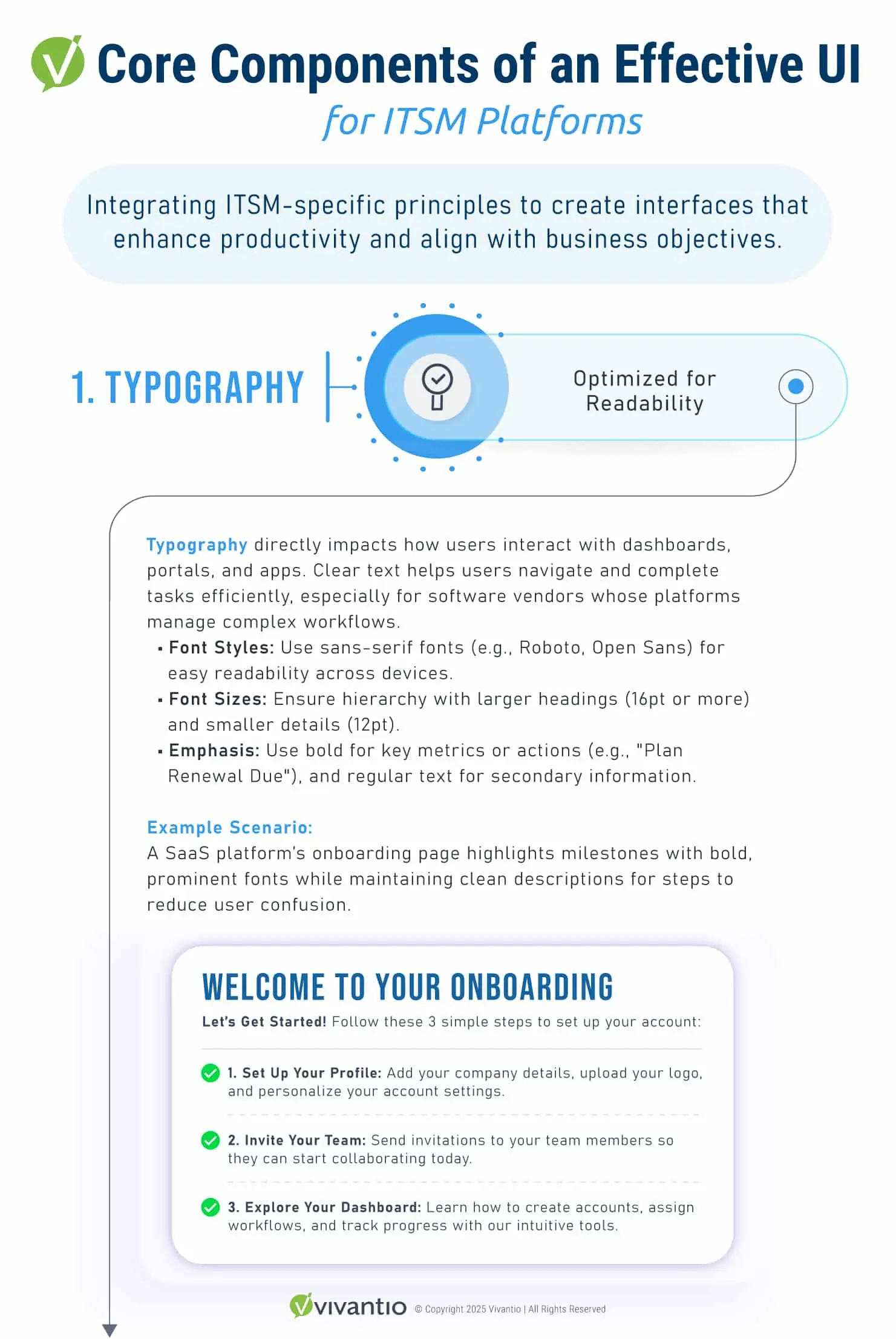
Designing a user interface (UI) for ITSM platforms requires a balance between general UI best practices and features tailored to ITSM workflows. By integrating ITSM-specific principles, organizations can create interfaces that enhance productivity, align with business objectives, and adapt to user needs over time.
Visual Design Components
- Typography: Select fonts and sizes optimized for readability in dense ticketing interfaces and extended usage scenarios.
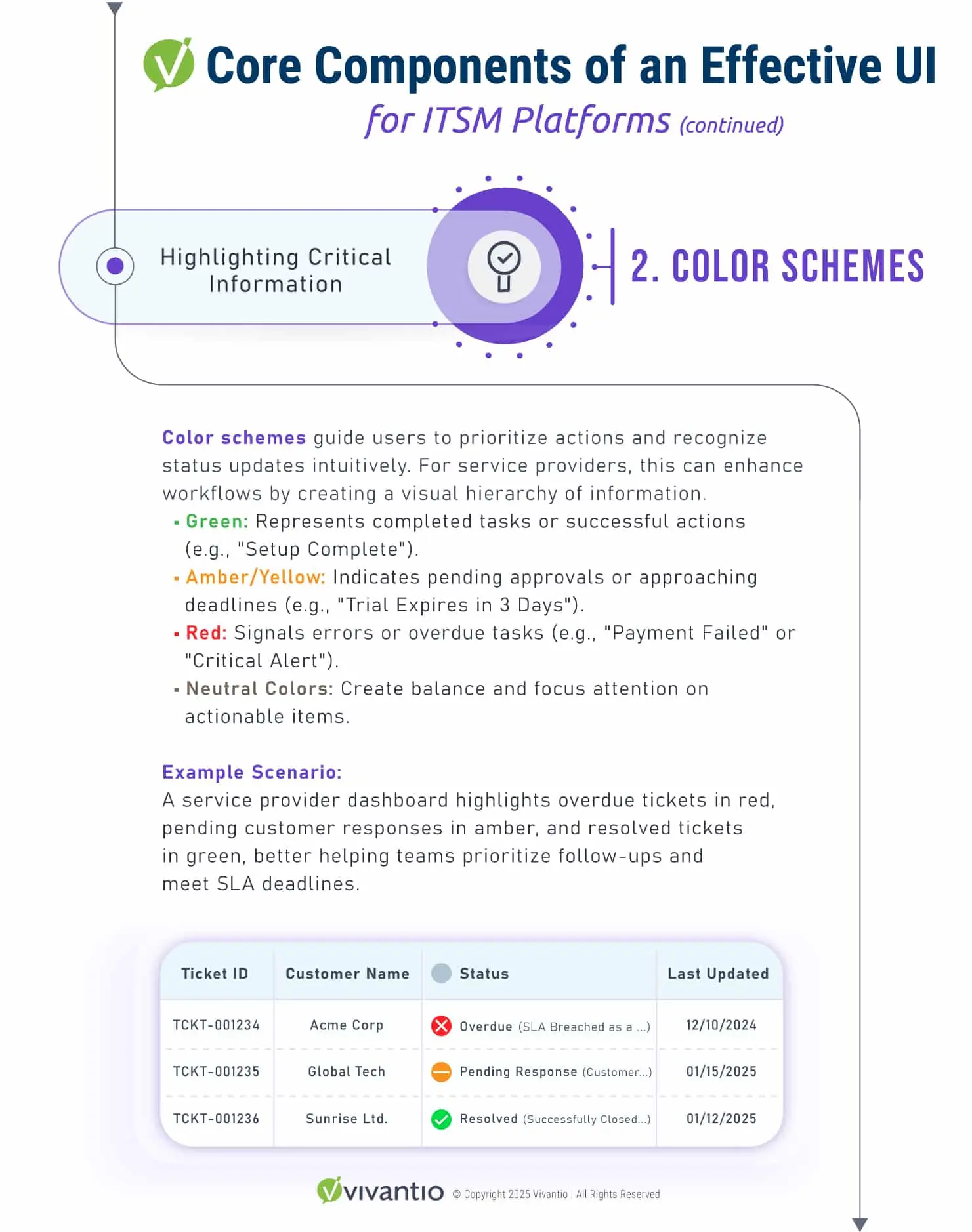
- Color Schemes: Implement cohesive palettes with strategic use of color coding to highlight critical information, such as SLA breaches or escalated incidents, while maintaining visual harmony.
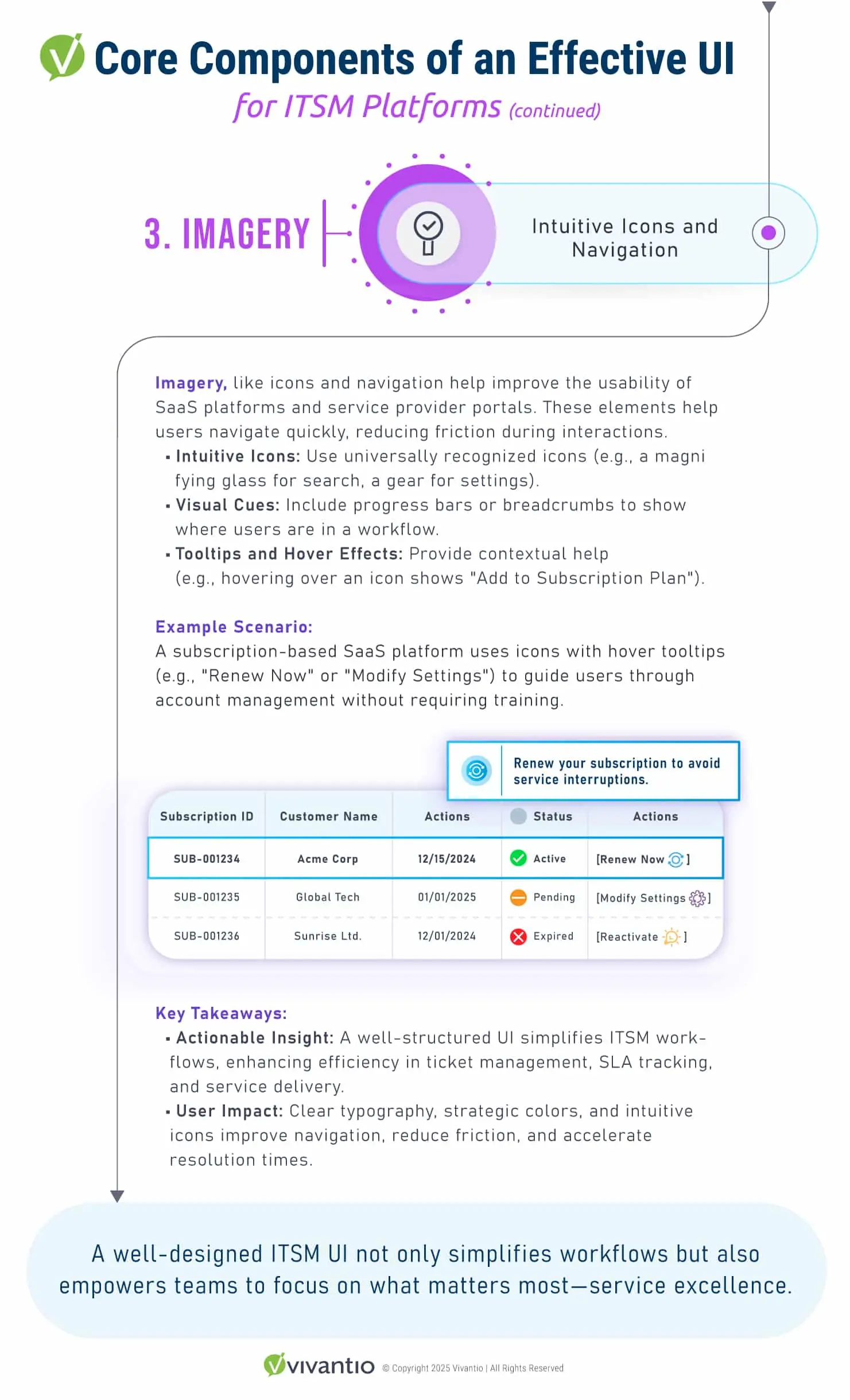
Imagery: Use intuitive icons and visual cues to guide navigation, ensuring they support functionality without overwhelming the interface.
Navigation Structure
Efficient navigation is the backbone of an intuitive ITSM platform. Logical and consistent structures reduce thinking overload, helping users access essential tools like dashboards, reports, and knowledge bases. Role-based navigation ensures that users see only the information and options relevant to their responsibilities, improving focus and efficiency.
Core Interactive Elements
Interactive components must be intuitive, responsive, and provide real-time feedback:
- Buttons and Menus:
- Ensure clarity and responsiveness by using visible states (e.g., hover, active) and real-time feedback for user actions such as closing tickets or approving changes. This reinforces user confidence and reduces errors.
- Progress Indicators:
- Use tools like progress bars, breadcrumbs, or status updates to guide users through workflows, such as incident escalation or service requests. This provides users with a clear sense of their position within a process.
Enhancements for Intuitive Interactivity
- Prioritize Simplicity:
- Avoid unnecessary complexity in your design. A streamlined interface reduces cognitive load, minimizes user errors, and improves overall satisfaction.
- Implement Accessibility Features:
- Design inclusively by adhering to accessibility standards (e.g., WCAG). Features like keyboard navigation, screen reader compatibility, and high-contrast modes ensure usability for all users.
- Provide Clear Feedback:
- Ensure users always know the outcome of their actions. For example, show confirmation messages or error alerts after submitting a form or updating a ticket. This reinforces trust in the platform.
- Regularly Test Usability:
- Conduct frequent usability testing to identify and address pain points early. Testing ensures your platform evolves in alignment with user needs and expectations.
- Adopt Emerging Trends:
- Stay ahead by integrating innovations that enhance the user experience, such as voice interactions for hands-free navigation or augmented reality (AR) features for complex visualizations, where appropriate.
ITSM-Specific Features and Their Role in Enhancing UI Design
ITSM platforms rely on well-designed features and structured methodologies to create intuitive, efficient, and adaptable user interfaces that support service management goals. These elements not only streamline workflows but also align the UI with broader organizational objectives.
Key Features of ITSM UI Design
- Dashboards and KPIs:
- Customizable dashboards provide actionable insights into service performance, SLA compliance, and ticket resolution times. These visual tools allow users to monitor critical metrics and make data-driven decisions.
- Service Catalog:
- A searchable, categorized service catalog simplifies service requests, enhances user autonomy, and reduces the workload on IT teams by enabling self-service.
- Knowledge Base Integration:
- An organized knowledge base with advanced search capabilities empowers users to find solutions independently, decreasing ticket volume and improving efficiency.
- Mobile Optimization:
- Responsive design ensures IT teams can efficiently access tools and data across devices, enabling seamless operations even on the go.
How ITSM Frameworks Enhance These Features
- Proactive Incident Management:
- ITSM frameworks enable the rapid identification and resolution of UI-related issues, minimizing disruptions and maintaining operational continuity. For instance, monitoring and addressing slow-loading dashboards prevents user frustration.
- Feedback Loops:
- Continual improvement processes within ITSM provide structured feedback mechanisms, allowing UIs to evolve in response to user needs and expectations. For example, user feedback can drive updates to the knowledge base or service catalog design.
- Service Design Alignment:
- ITSM aligns interface design with service objectives, ensuring consistency across platforms and improving the overall user experience. A unified design approach fosters user trust and operational efficiency.
By combining ITSM-specific features with its structured methodologies, organizations can build UIs that not only enhance user satisfaction but also support business goals through operational efficiency and strategic alignment.
Optimizing UI for Conversion and Engagement
A well-crafted UI isn’t just functional—it’s a strategic tool for improving business outcomes. Here’s how:
| ### UI Element | ### Impact on User Behavior |
|---|---|
| Visual Design Components | Improves comprehension and builds trust through professional design. |
| Navigation | Reduces friction, helping users find what they need efficiently. |
| Interactivity | Encourages engagement by making interactions seamless and intuitive. |
Common UI Design Mistakes to Avoid
As we shared in detail through this blog, creating a great user experience is essential for making your company the best it can be. Whether you’re building a business or striving to improve the one you work for, designing interfaces that truly meet user needs is a game-changer. At the same time, it’s just as important to recognize and avoid common pitfalls that could frustrate users and hinder success.
A well-designed UI should feel intuitive and effortless to use. Here are some key missteps to watch out for as you refine your UI:
- Poor navigation structure
- Insufficient feedback and response time
- Ignoring user expectations and needs
- Failing to conduct usability testing
Knowing these mistakes helps you design a UI that users love. This love turns into loyalty, helping your business grow. Good interaction design builds trust and makes users happy. By focusing on what users want, you can make your business thrive and keep customers coming back.
| ### Mistake | ### Consequence | ### Solution |
|---|---|---|
| Poor navigation structure | Confused users, high bounce rate | Implement intuitive navigation, conduct usability testing |
| Insufficient feedback and response time | Frustrated users, low engagement | Optimize response time, provide clear and timely feedback |
| Ignoring user expectations and needs | Low user satisfaction, high churn rate | Conduct user research, prioritize user needs and expectations |
Shaping the Future of Digital Experiences Through UI and ITSM Integration
The digital world is always evolving, and UI design is pivotal in shaping its future. When combined with the principles of IT Service Management (ITSM), businesses can deliver exceptional user experiences while maintaining operational efficiency. ITSM provides the framework to align UI design with broader service objectives, ensuring interfaces meet user needs and drive business success.
A well-designed UI, supported by ITSM practices, doesn’t just look good—it performs seamlessly. By integrating ITSM strategies, such as feedback loops and proactive incident management, businesses can ensure that their interfaces remain functional, user-friendly, and aligned with their service goals. ITSM frameworks also enhance user trust by enabling quick resolutions for service disruptions and improving consistency across platforms.
As technology advances, the synergy between intuitive UI design and robust ITSM processes will become even more critical. This integration helps businesses stay ahead in the competitive market while fostering trust and loyalty among users.
Ready to Elevate Your UI with ITSM?
Investing in exceptional UI design powered by ITSM is about more than aesthetics—it’s about creating functional, seamless, and engaging interactions that enhance user experiences and align with your operational goals.
Take the Next Step:
- Schedule a Free Consultation: Discover how integrating ITSM principles into your UI design can optimize user satisfaction and operational efficiency.
- Request a Demo: Explore tools and strategies that combine ITSM frameworks with cutting-edge UI design to enhance service delivery and reliability.
Start transforming your digital experiences today with the power of ITSM-driven UI design tailored for success.
Read more
Browse all resources


Ready to see it?
See Vivantio in action
Step your team up to real service management, without the leap to enterprise. Get a walkthrough tailored to your workflows.