






Post-Implementation Support Model: Benefits and Best Practices
A strong post-implementation support model ensures seamless knowledge transfer, reduces disruptions, and empowers teams for long-term success. This…

Jump to section
Introduction
When you introduce a new system or process, your main goal is a successful launch. But, have you thought about what comes next? A post-implementation support model is key to ensuring your system or process stays supported and maintained. This model is vital for any project, including important parts like documentation, training and resources, and project management.
In an ITSM setting, a post-implementation support model is crucial for ensuring system functionality, minimizing downtime, and addressing potential challenges promptly. A well-defined support phase combines a solid maintenance plan, comprehensive documentation, and a post-implementation review (PIR) to gather lessons learned, user feedback, and customer health metrics. This approach allows you to evaluate performance, oversee ongoing training, identify opportunities for continuous improvement, and refine strategies for future implementations.
Whether you’re managing an Enterprise Resource Planning (ERP) solution or another complex system, establishing a cross-functional roadmap for post-implementation activities helps maintain smooth business operations. Best practices for providing post-implementation support include clear objectives, regular webinars for ongoing training, and ensuring all stakeholders have easy access to resources and support. By handling routine maintenance effectively and updating your choices based on user feedback, you enhance both system performance and customer satisfaction.
An effective project doesn’t end at the go-live stage; it thrives with a robust post-implementation support model. In this blog, we’ll explore how this approach safeguards your system’s lifecycle, ensures a smooth transition, and helps your organization adapt to changes—all while maintaining compliance with privacy policies and maximizing return on investment.
Understanding the Foundations of Post-Implementation Support
When you bring in a new ERP system, it’s key to consider the ongoing support you’ll need after it has gone live. Activities like training, documentation, and maintenance and support are vital. These efforts help your project team adapt to the system, align it with your business process, and ensure it meets your organization’s project objectives. Good support services are crucial for a smooth transition, reducing risks, and keeping your system running efficiently.
The main parts of support models include detailed documentation, effective training programs, and regular maintenance. These elements work together to create a strong support framework that prioritizes timely assistance and reduces dependency on external support partners. ITSM plays a significant role in managing these components, ensuring ongoing support, open communication, and proper technical support. This approach helps identify areas for improvement, unlock productivity, and maximize the life cycle of your ERP system.
Key Components of Support Models
| ### Component | ### Description |
|---|---|
| Documentation | Providing detailed documentation of the system and its components |
| Training | Offering training programs to ensure that users are proficient in using the system |
| Maintenance | Performing regular maintenance tasks to ensure that the system remains operational and efficient |
Take GreenTech Solutions, for example. After implementing a new ERP system, they didn’t have a clear Post-Implementation Support Model in place. Without an ITSM strategy to manage support requests and monitor system performance, issues quickly piled up—employees faced difficulties with new processes, data inconsistencies occurred, and service disruptions began impacting productivity. With no structured approach to handle these problems, the team spent more time reacting to issues than ensuring long-term system success.
Had GreenTech implemented a well-defined Post-Implementation Support Model, including ITSM best practices like incident management, problem resolution, and continuous service improvement, they could have identified and addressed these challenges early. A proactive support model helps maintain system stability, ensures smoother operations, and aligns the ERP system with ongoing business goals.
Essential Elements of Knowledge Transfer
Knowledge transfer is a cornerstone of post-implementation support. It ensures that the support team has all the necessary information to handle any issues efficiently. To achieve this, it’s essential to cover a variety of knowledge transfer areas. Here’s a checklist to guide the process:
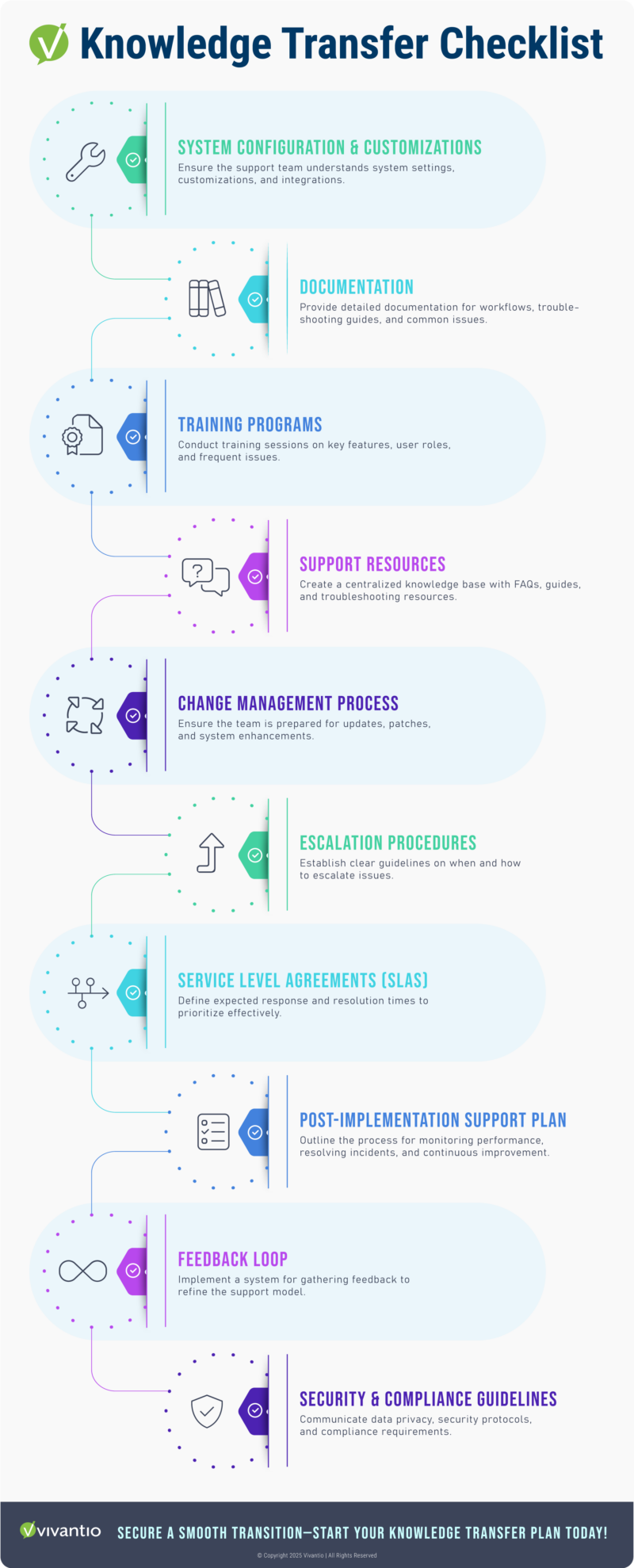
By covering these areas in your knowledge transfer plan, your support team will be better equipped to troubleshoot, reduce downtime, and maintain a stable system. This not only leads to faster resolution times but also ensures the long-term success of your system and project goals.
Documentation & Training Best Practices
Effective documentation is a critical component of post-implementation support. By providing clear, consistent, and up-to-date documentation, you ensure your support team can troubleshoot issues efficiently and confidently. Below are key practices and recommended types of support for each:
Develop Clear, Concise Documentation
Goal: Create documentation that is easy to understand and quick to reference.
Recommended Support:
- Troubleshooting Guides: Include step-by-step guides that the support team can follow to resolve common issues quickly.
- System Overview: A simple, high-level overview of the system’s key features, which helps new support staff get up to speed quickly.
- FAQs: Frequently asked questions with clear, concise answers to minimize confusion and streamline the support process.
- Video Tutorials: Short, instructional videos demonstrating how to resolve common issues or navigate specific features. These can be used as quick references during real-time support calls.
Use Standardized Templates & Formats
Goal: Ensure that all documentation is consistent and easy for the team to follow.
Recommended Support:
- Documentation Templates: Use standardized templates for various types of documentation, such as troubleshooting steps, system configurations, and FAQs. Templates ensure consistency across the support team and make documentation easier to update.
- Style Guides: Create a style guide that outlines how documentation should be written—ensuring consistent tone, formatting, and terminology throughout all materials.
- Knowledge Base Organization: Organize your knowledge base into clearly defined categories (e.g., Installation, Troubleshooting, Updates) and ensure each category follows the same structure, so information can be found quickly.
- Glossary of Terms: Include a glossary that defines key ITSM terms and jargon related to the ERP system, ensuring everyone is on the same page when referencing technical language.
Regularly Review & Update Documentation
Goal: Ensure your documentation stays relevant and accurate as the system evolves.
Recommended Support:
- Version Control: Implement version control to track changes made to documentation over time. This allows the support team to always access the most recent version and helps prevent confusion over outdated materials.
- Review Cycle: Set a regular schedule for reviewing and updating documentation. This could be quarterly or after major system updates, ensuring that the documents reflect any new features, customizations, or improvements.
- Feedback Loops: Encourage feedback from both the support team and end users to identify areas where documentation can be improved. A dedicated feedback system, such as a comment section at the end of each document, will allow continuous refinement.
- Change Logs: Include change logs to document what updates were made to the system and corresponding documentation. This helps the support team understand the scope of updates and quickly learn new procedures or features.
By implementing these documentation best practices and providing the necessary support tools, you can ensure that your team is equipped with the right resources to resolve issues quickly, maintain system stability, and drive long-term success.
Managing Common Support Challenges
When you launch your post-implementation support model, challenges are inevitable. These could range from resource allocation issues to knowledge gaps or system integration problems. However, by organizing your approach and implementing structured support practices, you can mitigate these challenges significantly.
Some common support challenges you may face include:
- Resource Allocation Issues: Ensuring that both your teams and users have access to the necessary resources to provide effective support. When resources are properly allocated—through clear documentation, adequate training, and accessible tools—your team can handle issues more efficiently.
- Knowledge Gap Management: Identifying and addressing knowledge gaps within your support team is crucial. By providing consistent training, clear documentation, and a feedback loop for continuous improvement, you ensure your team has the expertise needed to deliver quick and accurate solutions.
- System Integration Problems: Ensuring your support systems are well-integrated is essential for seamless service. Proper knowledge transfer, clear support procedures, and an efficient escalation process all contribute to smoother system integration and quicker problem resolution.
Understanding these challenges in advance and organizing your support resources accordingly will help you tackle them head-on. By addressing potential issues with clear strategies and thorough preparation—such as the best practices mentioned above—you’ll empower your support team to resolve problems swiftly. This not only enhances the quality of support but also improves the overall experience for your clients or users, ensuring long-term success for your system and organization.

Evolving Your Support Strategy for Long-Term Success
As post-implementation support evolves, it’s vital to refine your strategy to meet your company’s changing needs. Build a flexible, scalable support system that grows with your business, ensuring your team can address both current challenges and future demands.
Equip your support team with the right tools and training to quickly resolve issues and maintain high service quality. Collaboration between IT, business leaders, and end-users fosters efficient problem-solving and continuous improvement, allowing you to enhance your support model over time.
Commit to ongoing improvement by listening to user feedback and monitoring system performance. An agile approach to post-implementation support ensures your system remains adaptable, resilient, and ready to scale with your company’s growth.
Ready to Elevate Your Post-Implementation Support Strategy?
Investing in a comprehensive, flexible support system is key to optimizing your team’s performance and user satisfaction.
Take the Next Step:
- Schedule a Free Consultation: Discover how a flexible support model can streamline operations and enhance user experience across your organization.
- Request a Demo: Explore the features and tools that enable seamless post-implementation support, ensuring quick resolutions and long-term success.
Start evolving your support strategy today, ensuring your team is empowered, efficient, and ready for future growth.
Read more
Browse all resources
Ready to see it?
See Vivantio in action
Step your team up to real service management, without the leap to enterprise. Get a walkthrough tailored to your workflows.