






Master Data Integration Node Essentials for Your Business
Understanding data integration nodes is vital for business success. Learn how unifying your data from multiple sources leads to smarter decisions,…

Jump to section
Introduction
Understanding data integration nodes is critical for business success—according to a study by Accenture, companies that effectively integrate their data are 40% more likely to see improved decision-making and operational efficiency, driving higher profitability and growth. A data integration node is like a bridge. It helps you manage and access data from different places in one place. This makes it easier to use all your data for better decisions.
By learning about data integration nodes, you can make the most of your data. This is important for any business or service provider looking to grow and succeed.
Understanding Data Integration and Its Importance
Data integration means combining data from different sources into one cohesive view. By unifying data from various platforms—such as CRM systems, databases, and third-party tools—businesses and service providers can access a complete, real-time picture of their operations. This helps businesses use analytics more effectively, uncovering trends and insights that lead to smarter, data-driven decisions. It’s key to turning scattered data into actionable intelligence, allowing companies to streamline processes, personalize customer experiences, and respond quickly to market changes.
What is Data Integration?
Businesses are generating and collecting massive amounts of data from various sources. However, without a solid strategy to bring that data together, companies miss out on valuable insights. This is where data integration becomes crucial. By consolidating data from different places into a single, unified view, businesses and service providers can leverage the full power of their data to make informed decisions, enhance customer experiences, and drive growth.
- Definition: Combines data from multiple sources, such as databases and cloud storage, into a unified view.
- Purpose: Creates a complete picture of critical business metrics.
- Key Benefit: Enables businesses to analyze more data, leading to better understanding of market trends and customer behavior.
- Outcome: Helps companies make smarter, data-driven business decisions.
Why Businesses Need Data Integration
-
Increasing Complexity: As businesses grow, their data environments become more complex with various data silos and formats.
-
Key Challenges:
- Data silos preventing unified insights.
- Inconsistent data formats across platforms.
-
Benefits of Integration:
- Quick access to accurate, reliable data.
- Better decision-making through holistic data views.
- Improved customer service and operational efficiency.
Common Challenges in Data Integration
- Data Quality Issues: Ensuring all data is clean, accurate, and ready for analysis can be difficult.
- Real-Time Access: Achieving real-time data integration requires robust systems and tools.
- Diverse Data Formats: Integrating data from different formats adds complexity.
- Overcoming Challenges: Identifying these issues early helps businesses strategize solutions and fully capitalize on the benefits of data integration.
While data integration offers significant advantages, it also comes with its own set of challenges. Addressing issues like data quality, real-time access, and differing data formats is essential for unlocking the full potential of your business data. By adopting a comprehensive data integration strategy, businesses can overcome these obstacles, streamline operations, and turn raw data into actionable insights that drive success.
Types of Data Integration Nodes
Data integration nodes come in various types, each with its own role. Here are a couple:
| ### Type of Node | ### Description | ### Use Case |
|---|---|---|
| Batch Processing Node | Handles big data batches at set times. | Good when data doesn’t need to be up-to-date fast. |
| Real-Time Processing Node | Works with data as soon as it’s there. | Best for needing data right away. |
Knowing about nodes like batch and real-time helps improve your data strategy. It makes your data workflows better fit your business goals.
Benefits of Using Data Integration Nodes
Data integration nodes offer several advantages for your organization by helping you manage and utilize data more effectively. Key benefits include smoother data flow, improved accuracy, and enhanced quality control—all of which are essential for informed decision-making.
1. Streamlining Data Flow
- Efficient Information Transfer: Data integration nodes enable smoother information flow between systems.
- Faster Access: Get the data you need quickly, allowing for faster responses to business needs.
- Agility: The improved flow makes your business more agile and better equipped to handle changes.
2. Enhancing Data Accuracy and Quality
- Eliminating Data Silos: Integration nodes break down silos, ensuring your data is unified and accessible.
- Reducing Duplicates: By removing duplicate data, integration nodes improve data quality.
- Better Data Clarity: Accurate, clean data provides a clearer, more comprehensive view of your organization, which is vital for any data-driven strategy.
3. Improving Decision-Making Processes
- Informed Choices: With enhanced data accuracy and smoother flow, decisions are based on reliable information.
- Increased Efficiency: Well-integrated data leads to more efficient processes, allowing your team to focus on strategic actions.
- Competitive Advantage: Making faster, data-backed decisions improves your organization’s competitiveness in the market.

Data Integration Node Configuration and Setup
Setting up a data integration node is key to its success. It ensures your data flows smoothly between sources. A clear setup process helps avoid problems and keeps your node running well.
Step-by-Step Configuration Process
Setting up your data integration node requires careful planning and execution. Below is a detailed guide to ensure a smooth configuration process.
1. Identify Your Data Sources
- Understand the Scope: Before starting, clearly identify all the data sources you want to integrate, such as databases, cloud platforms, CRMs, or third-party APIs.
- Determine Data Types: Ensure you know the type of data being pulled from each source (e.g., structured data, unstructured data, streaming data) so you can prepare for proper handling and storage.
- Plan Data Flow: Visualize the end-to-end flow of how data will move between systems, including what should happen at each step (e.g., transformations, validations).
2. Check the Documentation for Your Integration Tool
- Review Compatibility: Ensure that your chosen integration tool supports the specific data sources you plan to connect.
- Platform-Specific Instructions: Each tool will have unique setup instructions. Access the tool’s official documentation for detailed steps, especially regarding connectors and supported protocols (e.g., REST APIs, JDBC, ODBC).
- Security Guidelines: Pay attention to any security-related configurations, such as encryption settings and authentication methods, to protect sensitive data during the integration process.
3. Input Correct Connection Details
- Credentials & Access Permissions: Gather the necessary login credentials (username, password, API keys) and ensure the accounts used have the correct permissions to access the data sources.
- Connection String Format: Verify that you’re using the correct format for connection strings or API integration endpoints. Different systems (SQL databases, cloud storage) require different connection parameters.
- Security Protocols: Make sure to configure any security settings (SSL/TLS) to secure data transmissions between the integration node and your data sources.
4. Test Your Connections
- Initial Connection Test: Once the connection details are entered, perform a test to ensure that each data source is successfully connected.
- Data Validation: Validate that the correct data is being pulled from each source. Look for issues like missing data, duplicate entries, or formatting inconsistencies.
- Performance Checks: Test the performance of the integration—ensure that data transfers occur within acceptable time limits, especially for real-time or high-volume data.
5. Finalize the Setup
- Review Settings: Double-check your configuration, including any scheduled refresh settings, data transformations, or backup options.
- Enable the Node: Once you’ve validated everything, enable the data integration node in your platform.
- Monitor Initial Performance: After enabling, closely monitor the first few data transfers for any potential issues and fine-tune the configuration if needed.
- Ongoing Maintenance: Plan for regular reviews and maintenance to keep the integration smooth and address any evolving needs (e.g., adding new data sources).
Enabling Your Data Integration Node
After successfully configuring your settings, it’s time to enable the integration node. Follow these steps:
- Access the Activation Settings: Navigate to the activation or node settings in your data integration platform. This is typically found under the ‘Integration’ or ‘Data Management’ section of your dashboard.
- Verify Configurations: Double-check that all necessary configurations have been completed, including authentication, data mappings, and any required API keys. It’s crucial to ensure that all data transformations, filtering rules, and workflows are correctly set to match your integration goals.
- Run a Test Sync: Before enabling the node, it’s a good practice to perform a test sync or simulation. This will help identify potential issues like data discrepancies, failed connections, or incorrect mappings.
- Enable the Node: Once you’re confident that everything is properly set up, proceed to enable the node. Pay close attention to any system logs or error messages during activation to catch any initial issues that might arise.
- Monitor for Errors: After enabling the node, keep an eye on the real-time logs or error reports. It’s important to ensure that data flows smoothly between systems without errors such as duplicate records, missing fields, or broken connections.
- Optimize Performance: With the node now active, review the integration performance. Check key metrics like data sync times, throughput, and error rates. Optimizing these parameters can help save time and significantly improve your overall data management efficiency.
By carefully following these steps, you can ensure a smooth and efficient data integration process, reducing the risk of downtime and boosting your data management capabilities.
| ### Step | ### Description | ### Tips |
|---|---|---|
| 1 | Access the Activation Settings | Ensure all integration-related settings and paths are correctly identified. |
| 2 | Verify Configurations | Verify all required configurations, including API keys, authentication, and data mappings. |
| 3 | Run a Test Sync | Perform a test sync or simulation to identify potential issues before full activation. |
| 4 | Enable the Node | Enable the node and pay close attention to system logs for any errors. |
| 5 | Monitor for Errors | Monitor real-time logs and error reports to catch and resolve issues promptly. |
| 6 | Optimize Performance | Review performance metrics like sync times and error rates for optimization opportunities. |
Data Transformations within an Integration Node
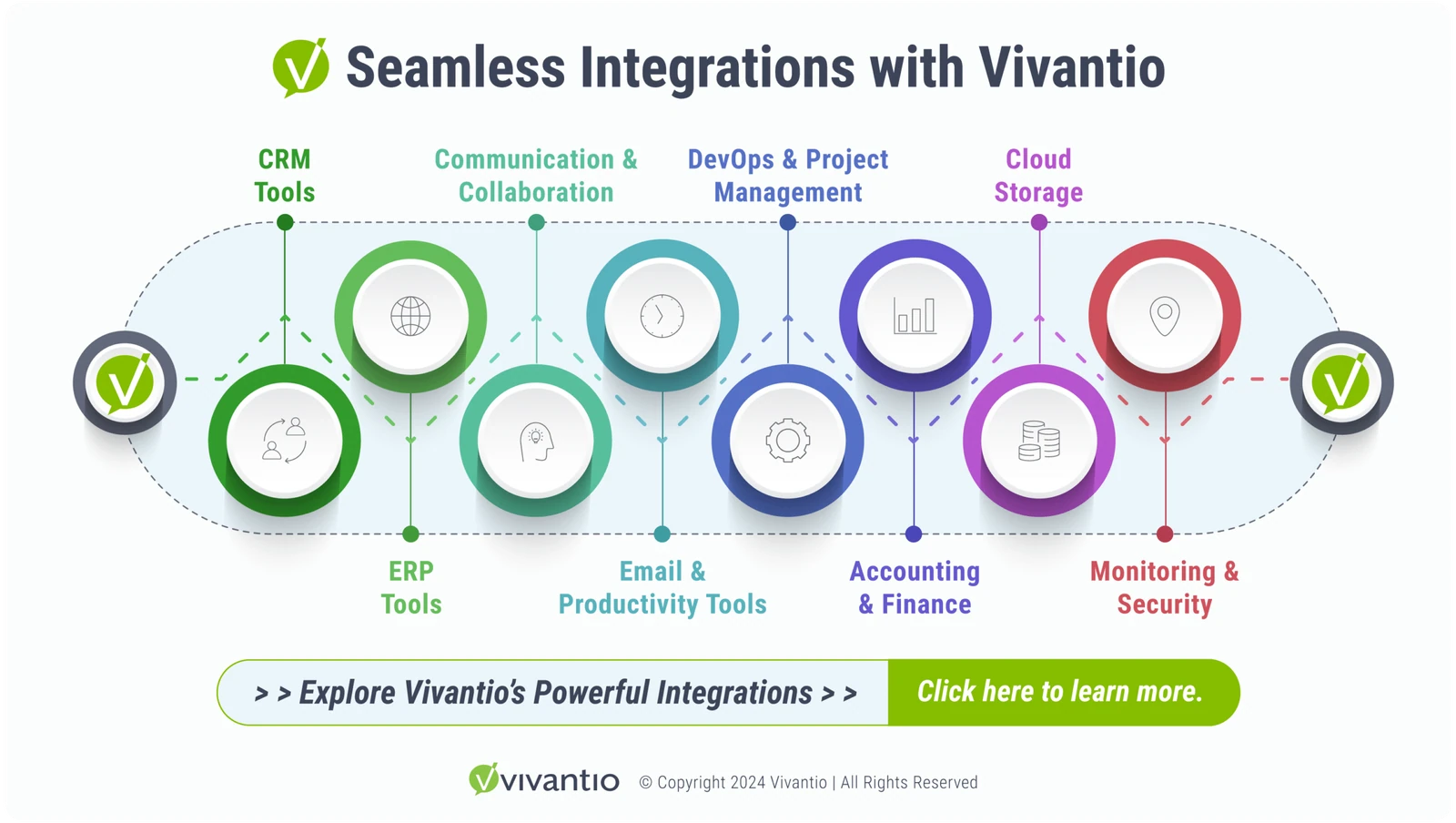
Data transformations are critical when it comes to managing and leveraging data in an integration node. By using a configurable platform, users can merge data from diverse sources, ensuring that information is consistent, structured, and ready for use across service operations. This is especially valuable when working with complex systems like MySQL, PostgreSQL, or even legacy databases. Flexible architecture empowers businesses to streamline their service management processes by effectively utilizing transformed data.
Executing Data Merges and Transformations
Executing data merges means combining various data streams into one unified view. By using a platform that supports seamless data manipulation, leverages SQL-based queries and workflows the process is simplified. Whether you are merging customer data or ticket histories, a sound platform should provide tools to run SQL statements efficiently, enabling accurate data transformation for in-depth analysis and informed decision-making.
Handling Different Data Formats
An integration node is capable of handling a wide range of data formats, including XML, JSON, and CSV, making it easier to integrate diverse data sources. With built-in data mapping and format conversion features, the right platform can ensure your system is capable of working with any format. This flexibility is essential for managing cross-platform data, helping businesses achieve smooth workflows regardless of the source system.
Optimizing Database Performance with MySQL and PostgreSQL
It’s important to choose a platform optimized for database interactions, particularly with MySQL and PostgreSQL, which enhances the integration node’s overall performance. PostgreSQL’s advanced query capabilities are ideal for managing large-scale, complex transformations, while MySQL’s reliable and scalable storage solutions ensure data integrity throughout the process. This makes Vivantio a robust solution for organizations managing large amounts of structured and unstructured data.
Ready to optimize your data integration and drive better outcomes for your business?**** Contact us today to discover how our integration solutions can enhance your service management operations.
Schedule a Free Consultation – Let’s discuss your specific data integration needs and explore how our platform can streamline your workflows and maximize efficiency.
Request a Personalized Demo – See how our powerful tools can transform your data integration process with:
- Seamless API Integration: Connect your CRM, ERP, and other critical systems for unified data sharing and smoother service management.
- Real-Time Workflow Monitoring: Identify bottlenecks and resolve issues quickly with our advanced tracking tools.
- Dynamic Authentication: Protect sensitive information with flexible, customizable security controls.
- Future-Proof Technology: Leverage AI, machine learning, and IoT to keep your system agile and competitive.
Experience enhanced performance and resilience with our data integration solutions, ensuring your business stays ahead in today’s fast-evolving data landscape.
Read more
Browse all resources
Ready to see it?
See Vivantio in action
Step your team up to real service management, without the leap to enterprise. Get a walkthrough tailored to your workflows.