

Remote Monitoring and Management (RMM): Enhancing Management Software
RMM software empowers IT professionals and Managed Service Providers (MSPs) by transforming their IT management into a centralized, automated, and secure…

Jump to section
Introduction
RMM software empowers IT professionals and Managed Service Providers (MSPs) by transforming their IT management into a centralized, automated, and secure operation, ultimately leading to improved efficiency, enhanced security, and reduced downtime..
A Virtual IT Command Center: Imagine a central hub accessible from anywhere with an internet connection. This is what Remote Monitoring and Management (RMM) offers, eliminating the need for physical visits and saving valuable time and resources.
RMM’s Powerful Features:
- Real-time Monitoring: Gain real-time insights into device health and performance (disk space, CPU usage, system logs) for proactive problem identification.
- Automated Tasks: Free up IT staff by automating routine tasks like software updates, patch management, and security scans.
- Centralized Management: Manage a vast number of devices and systems from a single platform, simplifying operations and streamlining workflows (especially for MSPs with multiple clients).
- Improved Efficiency: Automation and centralized management significantly enhance IT efficiency, saving costs and allowing IT professionals to focus on strategic initiatives.
- Enhanced Security: Proactive threat detection and vulnerability management are facilitated through integration with security tools, strengthening overall security posture.
Examples of RMM in Action:
- An IT professional can remotely deploy updates across a vast network during off-peak hours, minimizing disruption.
- An MSP can monitor all client systems from a single dashboard, identifying and addressing potential issues before they impact client operations.
Unveiling the Power of RMM Tools: Benefits and Use Cases
By offering these functionalities, RMM software unlocks a range of benefits for both MSPs and internal IT teams:
- Improved Efficiency and Reduced Costs: Automation and centralized management streamline processes, saving time and resources.
- Enhanced Security: Proactive monitoring and integrated security features strengthen overall IT security.
- Reduced Downtime: Proactive problem identification minimizes downtime and ensures optimal system performance.
Real-World Use Cases for RMM:
- MSPs: RMM software is a cornerstone solution, enabling remote and efficient management of client IT infrastructure.
- Internal IT Teams: RMM streamlines IT operations, improves endpoint management, and ensures optimal system performance.
- Multiple Locations: RMM facilitates remote monitoring and management of geographically dispersed IT infrastructure.
Exploring the Functionality of RMM Software: A Deep Dive
This section delves deeper into the core functionalities of RMM software, providing a clearer picture of how these tools empower remote monitoring and management.
Unveiling the RMM Agent: The Powerhouse Behind Remote Management
The RMM agent is a critical software component installed on each device you want to manage remotely. Think of it as the eyes and ears of your RMM system on each device. The agent performs several key functions:
- Data Collection: The agent continuously gathers data about the device’s health, performance, and configuration. This includes information like available disk space, CPU usage, memory utilization, software versions, and security settings.
- Automated Tasks: The agent can be configured to automatically execute tasks as instructed by the RMM platform. This can include deploying software updates, applying security patches, running antivirus scans, and backing up data – all without the need for manual intervention on each device.
- Real-Time Monitoring: The agent transmits data back to the RMM platform in real-time, allowing for continuous monitoring of system performance and identification of potential issues.
Automating Tasks for Increased Efficiency: Freeing Up IT Professionals
One of the most significant advantages of RMM software is its automation capabilities. RMM tools can automate a wide range of routine tasks that typically consume a large portion of IT staff’s time. Here are some key examples:
- Software Updates: RMM can automate the download and installation of software updates and security patches across all devices on your network. This ensures your systems remain up-to-date and secure without manual intervention for each device.
- Patch Management: Patching vulnerabilities in operating systems and applications is crucial for maintaining a secure IT environment. RMM software automates the patching process, ensuring all devices are patched promptly and consistently.
- Security Scans: Regular security scans are essential for identifying potential threats and vulnerabilities. RMM software can automate security scans on a scheduled basis, alerting IT professionals of any potential issues requiring attention.
- Inventory Management: Automating Asset Tracking
RMM software automatically generates and maintains an inventory of all devices on your network, simplifying asset tracking and management.
RMM software offers a comprehensive suite of functionalities designed to streamline IT operations and empower IT professionals. By automating routine tasks, providing real-time insights, and facilitating centralized management, RMM software allows IT teams to work smarter, not harder. This translates to improved IT efficiency, enhanced security, and a more proactive approach to managing your organization’s critical IT infrastructure.
Beyond Desktops: RMM and Mobile Device Management (MDM)
Technology has evolved to encompass a diverse range of devices, including laptops, tablets, and smartphones. Traditional IT management solutions often fall short in effectively managing this growing variety of endpoints. RMM software bridges this gap by integrating seamlessly with capabilities. Here’s how this integration benefits IT professionals:
- Unified Endpoint Management: Integrate the management of desktops, laptops, mobile devices, and servers under a single platform. This centralized approach eliminates the need for separate tools and streamlines overall endpoint management.
- Enhanced Security: MDM functionalities within RMM software can enforce device encryption, password policies, and remote wipe capabilities for lost or stolen devices. This strengthens the overall security posture of your IT infrastructure.
Improved User Experience: MDM features can simplify mobile device enrollment, application deployment, and remote access for authorized users.

Choosing the Right RMM Tool: Capabilities and Considerations
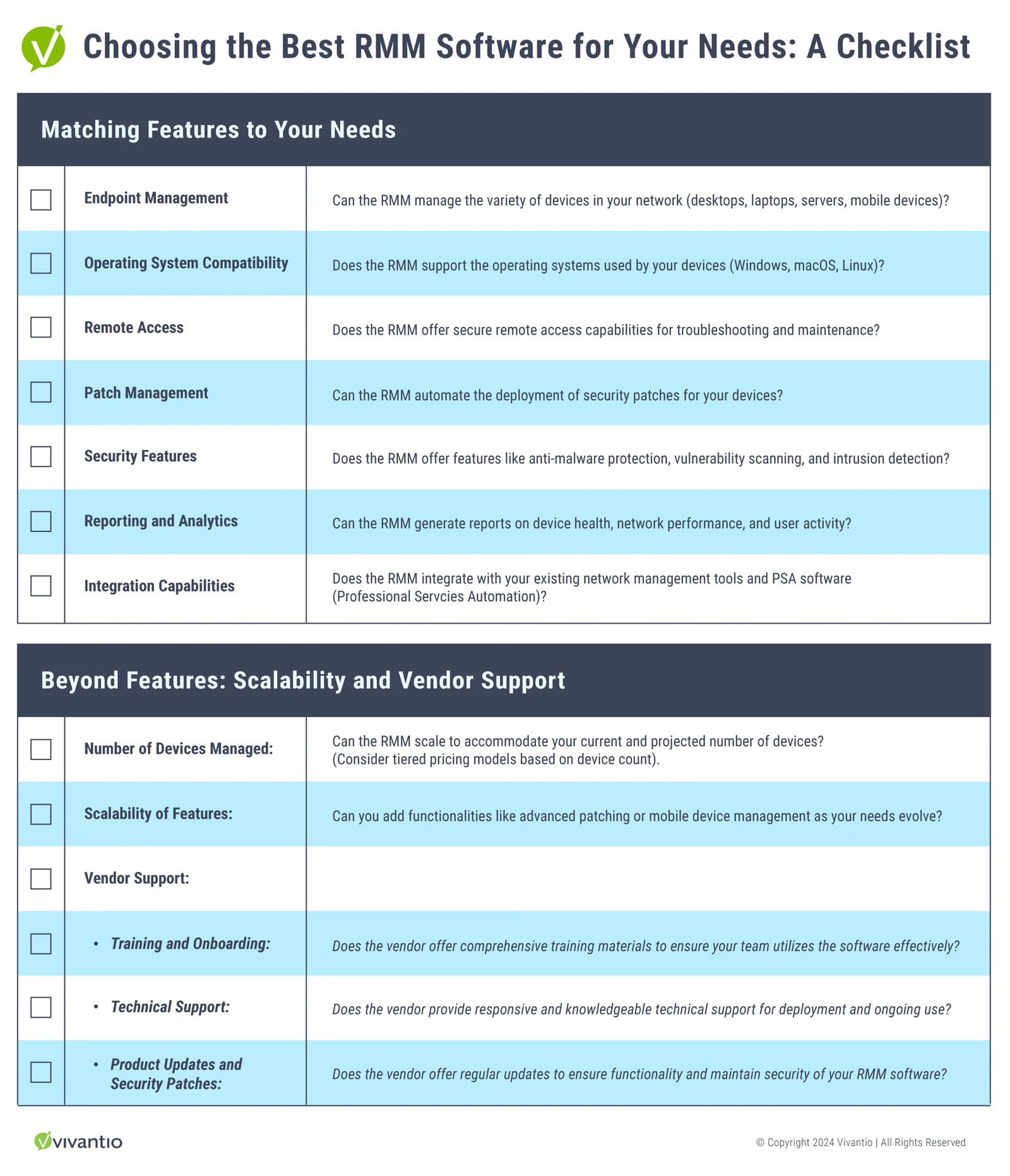
Selecting the right RMM software is crucial for maximizing its benefits. This section explores essential factors to consider, including the key capabilities of RMM tools. Here are some functionalities to prioritize:
- Endpoint Management: A robust RMM solution should offer comprehensive endpoint management capabilities, allowing for centralized management of desktops, laptops, mobile devices, and servers. This functionality is crucial for organizations with a diverse IT environment encompassing various device types.
- Remote Access: Secure remote access capabilities are essential for troubleshooting issues and performing remote maintenance tasks on devices. This allows IT professionals to address problems without physically traveling to the device location.
- Management Dashboard: A centralized management console provides a unified platform to monitor system health, deploy updates, and manage devices remotely. This allows IT professionals to manage their entire IT environment from a single location, simplifying workflows and improving overall efficiency.
- Reporting and Analytics: RMM software should offer robust reporting and analytics capabilities. This allows IT professionals to gain valuable insights into device health, network performance, and user activity. These insights can be used to identify trends, optimize system performance, and make informed IT decisions.
Beyond RMM: Integration with PSA Tools
For a truly holistic IT management solution, consider RMM software that integrates seamlessly with Professional Services Automation (PSA) tools. PSA software focuses on the business side of IT service delivery, including ticketing solutions, billing, and customer service management. Integration between RMM and PSA tools offers several benefits:
- Streamlined Workflow: Automating tasks and information exchange between RMM and PSA tools eliminates manual data entry and streamlines workflows.
- Improved Customer Service: Faster issue resolution through real-time data from RMM allows for better customer service within the PSA ticketing system.
- Enhanced Visibility: A unified view of IT operations, combining technical data (RMM) and business data (PSA), provides valuable insights for informed decision-making.
By carefully considering these factors and functionalities, you can select an RMM tool that best aligns with your specific needs and empowers your IT team to achieve optimal efficiency and security.
From Chaos to Control: A Historical Look at Holistic IT Management with RMM and PSA
The early days of IT management were a battle against chaos. Technicians juggled a physical world of servers and desktops, often relying on manual tasks and siloed tools. Diagnosing issues was a time-consuming detective game, and security vulnerabilities lurked in the shadows. As IT environments grew more complex, the need for a more holistic approach became increasingly clear. This historical look will explore how the rise of Remote Monitoring and Management (RMM) software and Professional Services Automation (PSA) software transformed IT management from a reactive scramble to a proactive, data-driven approach.
The Pre-RMM Era (Pre-2000s):
- IT management was a manual and reactive process.
- Technicians relied on physical access to servers and desktops for troubleshooting.
- Limited visibility into IT infrastructure led to reactive problem solving and frequent outages.
- Security vulnerabilities remained a significant concern due to the lack of automated patching and monitoring.
The Rise of Remote Monitoring and Management (RMM) – (Early 2000s):
- The need for a centralized management solution led to the development of RMM software.
- RMM offered features like remote device monitoring, patch management, and automated tasks.
- Technicians gained the ability to proactively identify and address potential issues before they impacted users.
- Increased focus on automating routine tasks allowed IT staff to focus on strategic initiatives.
The Emergence of Professional Services Automation (PSA) – (Mid-2000s):
- While RMM addressed the technical aspects of IT management, a gap remained on the business side.
- Manual ticketing, billing, and service delivery processes hampered efficiency and productivity.
- PSA software emerged to automate these processes and streamline service delivery.
- Integration between RMM and PSA created a unified platform for managing both the technical and business aspects of IT services.
The Holistic IT Management Revolution (Late 2000s – Present):
- The combined power of RMM and PSA transformed IT management into a data-driven and proactive approach.
- Real-time visibility into IT infrastructure and automated service delivery processes increased efficiency and user satisfaction.
- Improved security posture through proactive threat detection and automated patching further enhanced overall IT health.
- This synergy between RMM and PSA has become the foundation for modern IT management, empowering teams to navigate the complexities of ever-evolving IT landscapes.
The evolution of IT management from manual processes to a data-driven approach fueled by RMM and PSA software has revolutionized how IT professionals tackle their challenges. Today’s holistic approach empowers teams to proactively manage infrastructure, automate tasks, and prioritize security – all while boosting efficiency and ensuring user satisfaction.
Why RMM Software is Essential for Modern IT Management
By implementing a robust combination of RMM and PSA solutions, IT professionals and MSPs gain a significant competitive advantage. This dynamic duo empowers them to deliver exceptional service, optimize security, and streamline workflows across both the technical and business aspects of IT management. Ultimately, this ensures the smooth operation and efficiency of their IT infrastructure.
As technology evolves, RMM and PSA software will continue to enhance capabilities. We can expect advancements in AI-powered automation, advanced security features, and seamless integration with emerging technologies. This continuous development ensures IT professionals stay ahead of the curve, delivering proactive, data-driven management with minimal disruption.
Ready to unlock the power of a holistic IT approach? Contact Vivantio today!
-
Schedule a free consultation: [Link to contact page] – Discuss your specific needs and explore how Vivantio’s combined RMM and PSA solutions can empower your team.
-
Schedule a personalized demo: [Link to demo page] – See how Vivantio’s software can transform your IT management with:
- Effortless Automation: Automate routine tasks and free up your team to focus on higher-value activities.
- Centralized Control: Manage your entire IT infrastructure and service delivery processes from a single platform, streamlining workflows and boosting efficiency.
- Enhanced Security: Proactive monitoring and robust security features strengthen your overall IT security posture.
- Improved Client Satisfaction (for MSPs): Deliver exceptional service to clients by proactively addressing issues and minimizing downtime through workflow automation and enhanced communication.
With Vivantio’s comprehensive solutions, you can unlock both the technical and business benefits of a holistic IT approach, gaining a competitive edge in the dynamic IT landscape.
Read more
Browse all resources
Ready to see it?
See Vivantio in action
Step your team up to real service management, without the leap to enterprise. Get a walkthrough tailored to your workflows.