






The Integrations Landscape for Customer Service & Service Operations
Integration used to be a checkbox. Now it’s the difference between coordinated service and constant workarounds. This piece breaks down what the…

Jump to section
Where We Are Now — and What Will Matter in 2026
Integration used to be a checkbox.
You connected a tool.
You moved on.
That model quietly broke.
Service teams today don’t fail because they lack software. They fail because their systems don’t cooperate when it matters — during escalations, outages, renewals, or the moment a customer asks a question that spans more than one system.
That’s the shift worth paying attention to.
The Scale Problem Isn’t Theoretical Anymore
Large enterprises now report managing close to 900 applications on average, yet fewer than 30% of those systems are meaningfully integrated. Integration remains the most cited blocker to automation and AI initiatives.
That number sounds extreme — and for mid-market organizations, it is.
But it’s still useful.
Not as a literal comparison.
As a benchmark for how fast complexity grows when integration depth lags behind adoption.
Because the same pattern shows up much earlier.
A Mid-Market Reality Check
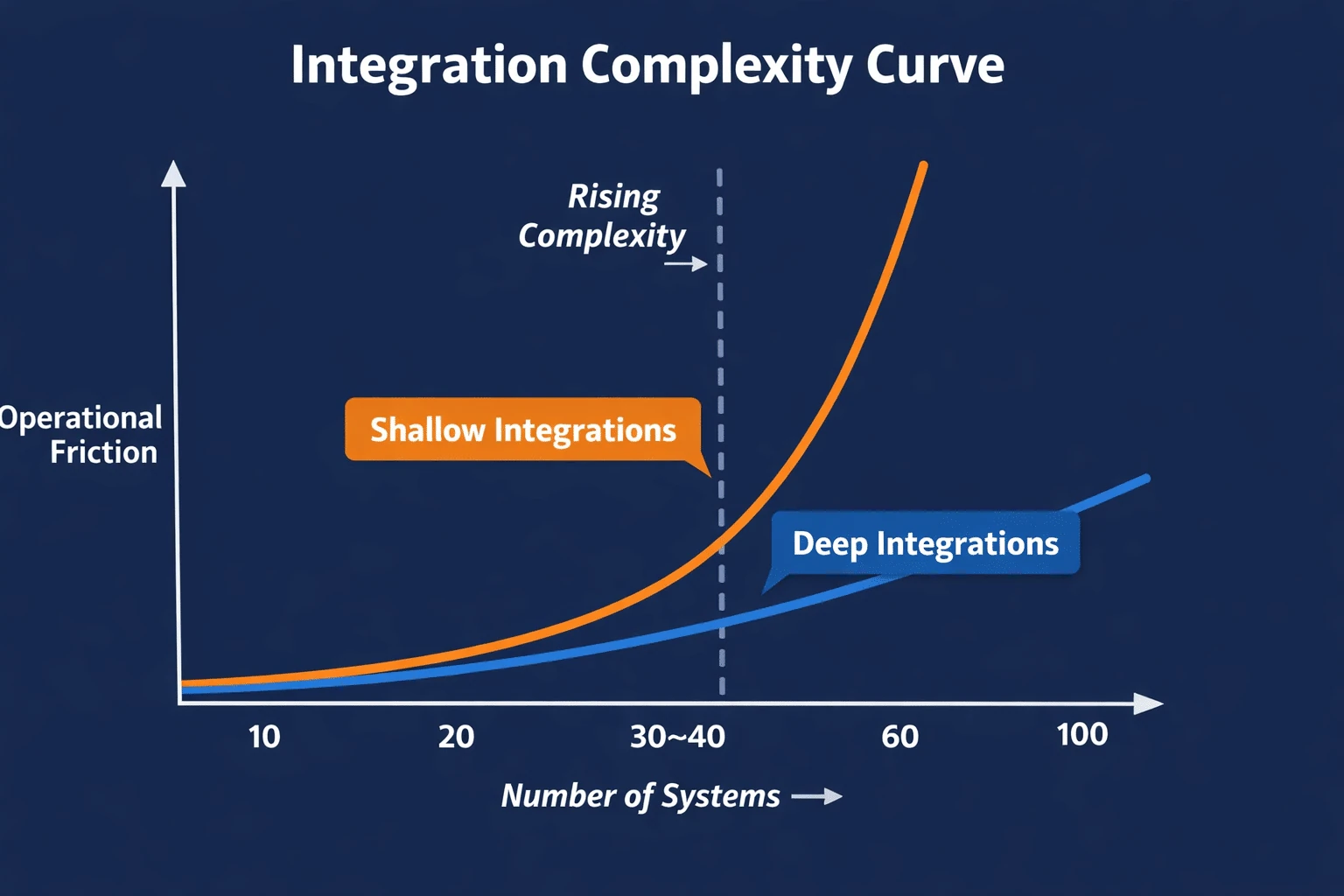
Most mid-market organizations operate with roughly 30–120 active applications, depending on industry, regulatory pressure, and digital maturity.
The integration problems don’t wait for scale.
They usually surface once teams cross 30–40 systems.
That’s when customer context starts living in multiple places.
That’s when reporting requires cleanup before it’s trusted.
That’s when a service agent opens three tabs and still doesn’t have the full picture.
That’s when someone pastes an explanation into Slack at 10:47 PM because the systems won’t talk.
These ranges aren’t formal benchmarks. They’re directional.
What matters isn’t the number of tools.
It’s how quickly complexity compounds — and how few systems are connected deeply enough to support real work instead of workarounds.
What Buyers are Actually Evaluating Now
Buyers aren’t asking whether a platform integrates anymore.
They’re asking whether the integration does anything useful.
- Can it trigger work automatically?
- Can it pass context without breaking?
- Can it hold up under volume?
- Can AI rely on the data without guessing?
That’s why integration depth has replaced integration coverage as a buying signal.
The Eight Integration Categories That Now Define Service Platforms
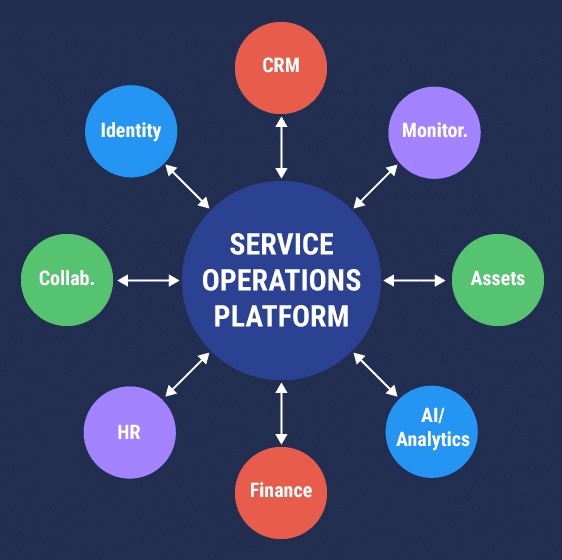
Most service platforms are evaluated through the same lenses, whether teams name them explicitly or not.
- Identity and access
- Communication and collaboration
- CRM and customer data
- Monitoring and operational signals
- Asset and endpoint management
- HR and employee systems
- Finance and billing
- AI, automation, and analytics
These categories aren’t new.
What’s changed is how unforgiving they’ve become.
Identity & Access: When Authentication Isn’t Enough
Identity integrations exist to answer one question quickly: who is this, and what are they allowed to do?
A new employee starts. Access requests pile up. Someone opens a ticket asking for permissions they should already have.
When identity integrations are wired properly, access isn’t a conversation. It’s a consequence of role, status, and timing.
When they aren’t, service teams become gatekeepers.
- A contractor leaves but still has access
- A role changes but permissions don’t
- An agent sees tickets they shouldn’t — or can’t see the ones they need
Most identity integrations authenticate users. Fewer inform service workflows.
You feel the difference the first time someone asks, “Why did they still have access?”
Communication & Collaboration: Where Context Goes to Die
Service work doesn’t happen inside the ticket alone.
A customer replies in WhatsApp. Engineering discusses it in Slack. Support tracks it in the service platform.
If those threads don’t reconnect, context evaporates.
When collaboration integrations work, conversations orbit the work. When they don’t, they float.
- Slack messages without links back to cases
- Verbal resolutions never captured
- Service history reconstructed from memory
A week later, someone asks, “Did we actually resolve this?”
CRM & Customer Data: The Quiet Source of Most Service Friction
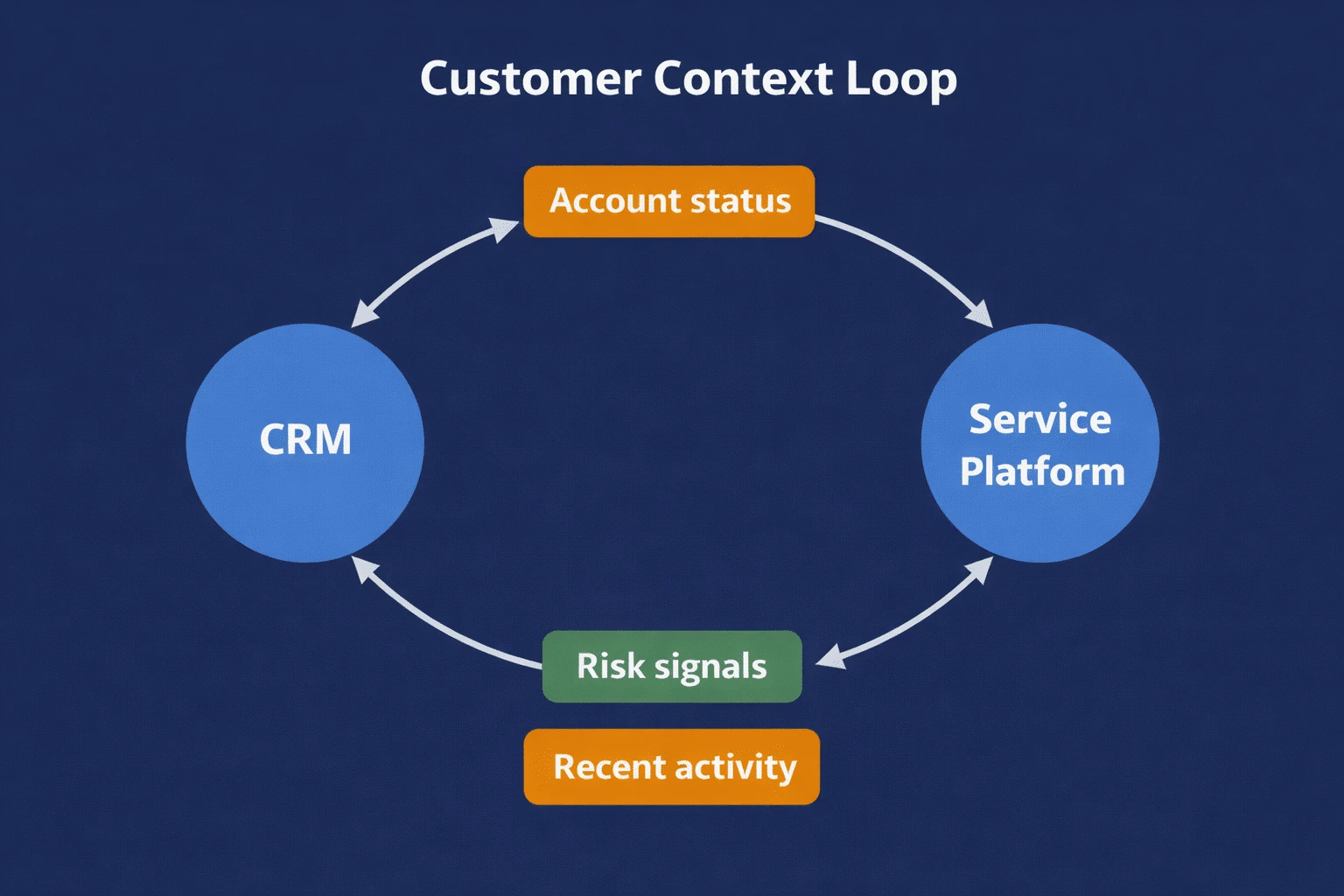
CRM integrations exist to prevent service teams from operating blind.
Support handles an issue. Sales negotiates a renewal. Neither knows what the other just learned.
When CRM integrations work, agents see account status, lifecycle stage, and recent activity.
When they don’t, service teams guess.
- One-way syncs
- Delayed updates
- “That’s not what we told the customer” moments
CRM integration failures don’t announce themselves. They show up after trust is already damaged.
Monitoring & Operational Signals: Alerts Don’t Equal Action
Monitoring tools are good at detecting problems. Service teams are responsible for owning them.
An alert fires at 2:13 AM. No one owns it. Customers notice before the service team does.
When integrations are considered deeply, alerts become cases. Ownership is clear.
When they aren’t, alerts pile up.
- No deduplication
- No prioritization
- No mapping to customers or assets
Louder alarms don’t fix this. Better translation into workflow does.
Asset & Endpoint Management: Context Should Not Be Optional
Troubleshooting without asset context is guesswork.
A ticket comes in. No one knows what device, system, or service it refers to.
Asset integrations exist to answer a simple question: what is this ticket actually about?
When they work, tickets are anchored to known assets. Patterns emerge.
When they don’t, assets exist but relationships don’t.
That’s not a tooling gap. That’s an integration gap.
HR & Employee Systems: Internal Service is Still Service
Every join, move, and leave creates service work.
When HR integrations are intentional, these moments trigger workflows automatically.
When they aren’t, onboarding becomes manual and offboarding risky.
Even basic HR signals prevent weeks of friction when they’re integrated deliberately.
Finance & Billing: Visibility Without Action Isn’t Enough
Nothing derails a service conversation faster than billing confusion.
Support sees the issue. Finance has the data. Everyone waits.
When finance integrations work, disputes route with context.
When they don’t, data is visible but inert.
- You can see the invoice
- You can’t trigger a workflow
- You can’t resolve the issue
AI, Automation & Analytics: Amplification, Not Replacement
AI doesn’t fix weak integrations. It exposes them.
AI is added. Answers sound confident. They’re wrong.
Not because AI failed — because the inputs were incomplete.
AI works best above a stable operational layer, not instead of one.
The Pattern Many Teams Miss
Most failures don’t come from missing integrations.
They come from shallow ones.
The gap shows up as:
- Reopened tickets
- Manual reconciliation
- Slack explanations that should be system behavior
That’s not bad software.
That’s incomplete thinking.
What This Means Heading Into 2026
Service platforms are becoming operational backbones.
They’re expected to coordinate across teams, absorb automation, support AI responsibly, and hold context under pressure.
That only works when integrations are designed as workflows — not connectors.
By 2026, platforms that treat integrations as a surface feature will struggle.
Not because they lack ambition.
Because the work has outgrown the shortcuts.
One Last Thought On Integrations Strategy
Complexity doesn’t announce itself.
It accumulates quietly — one tool, one workflow, one exception at a time.
Integration strategy is how service organizations decide whether that complexity becomes infrastructure or permanent friction.
That decision is already being made.
Read more
Browse all resources

Ready to see it?
See Vivantio in action
Step your team up to real service management, without the leap to enterprise. Get a walkthrough tailored to your workflows.