






What is Patch Management?
Keeping your IT systems safe and up-to-date is paramount, and patch management software is an essential tool for endpoint management. It helps you obtain,…

Jump to section
Introduction
Keeping your IT systems safe and up-to-date is paramount, and patch management software is an essential tool for endpoint management. It helps you obtain, test, and deploy updates for your applications and IT tools efficiently. By streamlining the update process, patch management software reduces the risk of security vulnerabilities.
This software addresses bugs, enhances security, and optimizes performance. Integrating patch management within an IT Service Management (ITSM) framework and aligning with ITIL best practices further strengthens your IT infrastructure and patch compliance. ITIL’s structured approach ensures that the patching process is managed systematically, improving IT service delivery and customer satisfaction.
Gartner highlights the growing importance of automated solutions in IT. Forrester emphasizes the need for rapid resolution of software issues. Data from TechRepublic demonstrates how automated patch management software minimizes system downtime, underscoring its value in maintaining smooth operations. By incorporating ITSM principles and ITIL guidelines, businesses can enhance their customer service management, ensuring that IT services meet the highest standards of reliability and performance.
Understanding Patch Management
Keeping software up-to-date is essential for maintaining optimal performance and security. Patch management plays a critical role in this process, ensuring your systems remain safe and your software vulnerabilities are addressed by keeping everything current. Here are some key reasons to implement patch management:
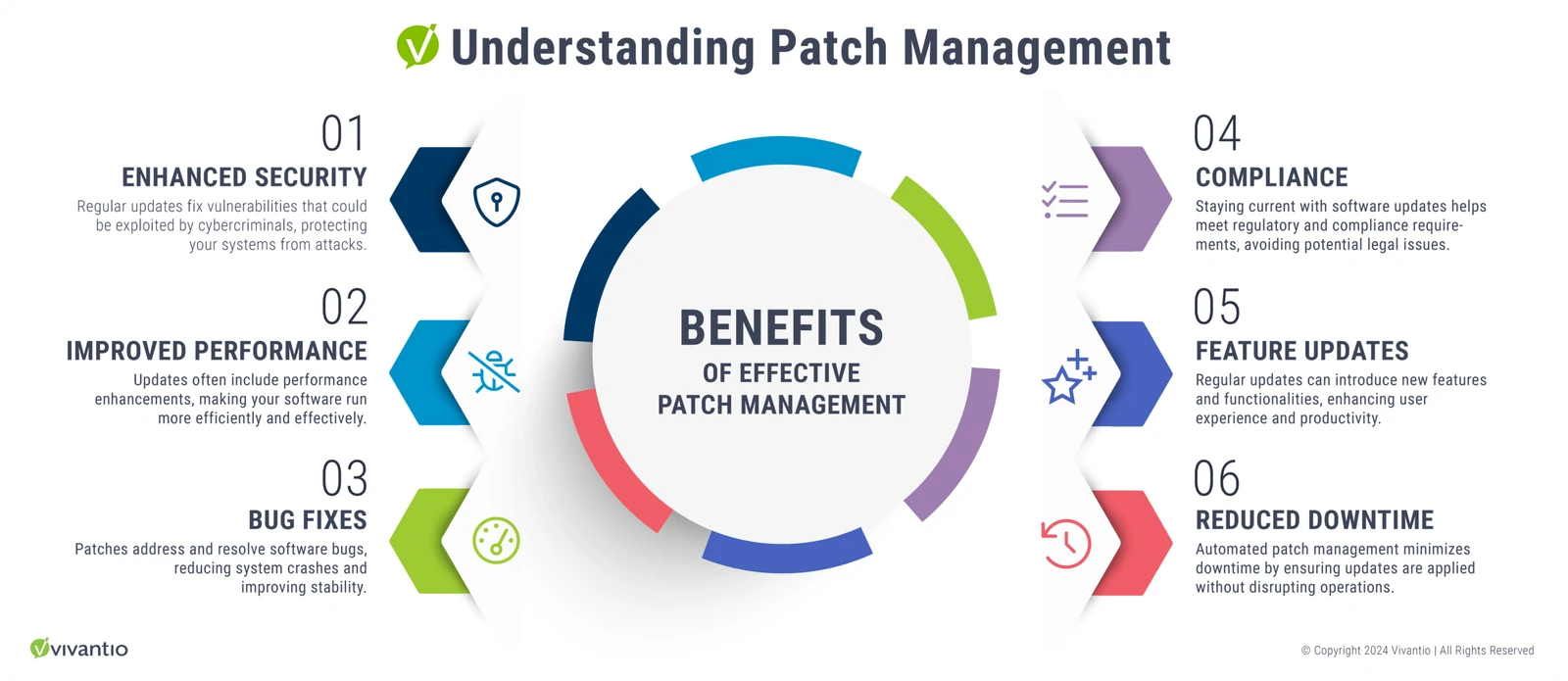
The Benefits of Effective Patch Management
1. Enhanced Security
- Regular updates fix vulnerabilities that could be exploited by cybercriminals, protecting your systems from attacks.
2. Improved Performance
- Updates often include performance enhancements, making your software run more efficiently and effectively.
3. Bug Fixes
- ****Patches address and resolve software bugs, reducing system crashes and improving stability.
4. Compliance
- Staying current with software updates helps meet regulatory and compliance requirements, avoiding potential legal issues.
5. Feature Updates
- Regular updates can introduce new features and functionalities, enhancing user experience and productivity.
6. Reduced Downtime
- Automated patch management minimizes downtime by ensuring updates are applied without disrupting operations.
Implementing a robust patch management strategy ensures that your IT environment remains secure, reliable, and efficient. This includes managing not only your core systems but also any third-party software that is integral to your operations.
Third-party software often introduces additional security vulnerabilities and compatibility issues, making it essential to include it in your patch management process. By incorporating updates and patches for third-party applications, you can address potential vulnerabilities and ensure compatibility with your main systems. This comprehensive approach to patch management minimizes risks associated with outdated or unsupported software, enhances overall security, and maintains smooth operations across your entire IT infrastructure.
Examples of How a Patch Management Solution Serves Your Business and Clients
A patch is a software update designed to fix bugs, improve stability, or add new features. Companies like Microsoft frequently release these updates for their software, such as Windows. Regularly applying software patches is crucial for addressing vulnerabilities and reducing risks. Here are some examples of how patching software can benefit your business and the clients you serve:
Enhanced Security for Financial Institutions
A financial institution regularly handles sensitive customer data and must ensure its systems are secure. By implementing a robust patch management process, the institution quickly addresses security vulnerabilities in its banking software. This proactive approach protects customer data from cyber threats and maintains trust with clients.
Improved System Performance for Healthcare Providers
A healthcare provider relies on various software applications for patient management and medical records. By keeping these applications up-to-date with the latest patches, the provider ensures optimal performance and reduces the likelihood of system crashes during critical operations. This leads to better patient care and streamlined administrative processes.
Compliance and Reliability for Legal Firms
Legal firms must comply with strict data protection regulations. Regularly applying patches to their case management and communication systems helps maintain compliance and ensures the reliability of their IT infrastructure. This reduces the risk of data breaches and legal repercussions, allowing the firm to focus on serving its clients effectively.
Customer Satisfaction for E-commerce Businesses
An e-commerce business depends on its website and backend systems to provide a seamless shopping experience. By implementing an efficient patch management strategy, the business can quickly apply updates that enhance website performance, fix bugs, and introduce new features. This leads to higher customer satisfaction and increased sales.
Reduced Downtime for Manufacturing Companies
A manufacturing company relies on various software systems for production management. By regularly applying patches, the company can prevent system failures and minimize downtime. This ensures continuous production and timely delivery of products to clients, maintaining a strong reputation in the market.
Patch management is essential for stopping cyber-attacks, preventing system failures, and maintaining smooth operations. By applying patches promptly, businesses can protect their servers from threats, keep systems running efficiently, and provide reliable services to their clients.
Common Patch Management Best Practices
Patch management best practices include:
- Identification of vulnerabilities: Scanning systems regularly to find threats.
- Creation and testing of patches: Making and testing patches to make sure they work right without causing problems.
- Deployment of patches: Putting patches on the network in a way that causes little downtime.
- Monitoring for compliance and effectiveness: Checking that patches are applied correctly and improving security and stability as expected.
Groups like MITRE, NIST, and SANS stress the need for a strong patch management plan to fight cyber threats.
| ### Institution | ### Focus Area |
|---|---|
| MITRE | Details the nature of software patches in its CVE database. |
| NIST | Highlights the key role of quick patching in cybersecurity. |
| SANS Institute | Offers a workflow for the patch management process and best practices. |

Automate Patch Management: Benefits
Automating patch management within an ITSM framework and following ITIL best practices brings numerous benefits, ensuring your IT systems remain secure, compliant, and high-performing. Here’s a closer look at how automation enhances patch management:
Enhanced Security
Automated patch management significantly improves security. By promptly deploying patches, it addresses vulnerabilities quickly, reducing the window of opportunity for hackers. This automated approach is crucial for maintaining the security of various devices. Within an ITSM framework, automated patch management integrates seamlessly with other IT processes, enhancing overall security posture.
Regulatory Compliance
Automation helps in consistently meeting regulatory requirements. By automatically applying patches, your systems stay up-to-date with industry standards. This reduces the risk of non-compliance penalties and bolsters your company’s credibility.
Improved System Performance
Automating patch management enhances system performance. Automated patches quickly resolve bugs and optimize software, ensuring your systems operate smoothly. Many businesses notice substantial performance improvements with automated patch updates.
Following best practices in automated patch management, such as maintaining a regular patch schedule within an ITSM system, results in faster and more reliable operations, thereby boosting overall business efficiency.
Features to Look for in Patch Management Software
When looking at patch management systems, some key features are crucial. They make sure patches are deployed and managed well. Look for software that makes things simpler and boosts security in your IT setup. Here are the main features to think about:
Automation Capabilities
Automation is key for making patch deployment smoother. It cuts down on manual work, lowers mistakes, and applies patches fast. A good patch management system lets you set up and apply patches automatically. This cuts down on downtime and makes things more efficient.
Comprehensive Reporting
It’s vital to have detailed reports on your patch status and how you’re meeting standards. Good software offers reports and dashboards that show which patches are updated and which aren’t. This helps you keep track, audit, and follow rules set by ISACA.
Choosing the Best Patch Management Software
Selecting the right patch management software is crucial for maintaining the security and functionality of your IT infrastructure. Patch management involves identifying, acquiring, installing, and verifying patches for various software systems and applications. The right patch manager offers several essential features that streamline this process and ensure that your systems remain up-to-date and secure.
Patch Management Features
When choosing patch management software, look for the following key features:
- Automated Patch Deployment: This feature allows patches to be automatically deployed to systems, reducing the need for manual intervention and ensuring timely updates.
- Server Patching: Effective patch management software should support patching for various server types, ensuring all critical systems are updated.
- Comprehensive Reporting: The software should provide detailed reports on patch status, compliance levels, and any issues encountered during deployment.
Patch management software can also integrate with other IT management tools to provide a more seamless and efficient workflow. This integration can enhance your overall IT service management (ITSM) capabilities.
Leveraging Patch Management with Vivantio
While Vivantio does not perform asset discovery or patch management directly, it plays a crucial role in managing the patching process. Third-party tools flag missing patches and raise tickets for your IT team to review and address. Here’s how Vivantio supports the patch management workflow:
- Ticket Management: Vivantio manages the work items generated by patch management tools. When a patch is identified, a ticket is created for the IT team to review, test, and plan the rollout.
- Change Management: Vivantio is used to manage the change process for rolling out patches. This includes reviewing and authorizing updates, putting rollback plans in place, and monitoring the impact of the patch.
- Problem and Incident Management: If a patch causes widespread issues, Vivantio helps manage the problem records and track workarounds or rollbacks.
By integrating patch management software with Vivantio, you can leverage patch management more effectively, ensuring a well-coordinated and efficient patch deployment process. Vivantio ensures that all changes are tracked, reviewed, and managed according to best practices, providing a robust framework for maintaining system stability and security.
Implementing an Effective Patch Management Strategy
Managing patches well means having a comprehensive patch management plan. This plan should look at updates and sort them by how serious they are. This way, the most urgent patches get fixed first, keeping your systems safe.
Start by understanding what your organization or clients need and what software they use. Testing patches in a safe space before applying them is a smart move. This helps avoid problems in your main systems. Using a step-by-step rollout also helps keep things running smoothly by fixing issues little by little.
It’s important to keep an eye on your patch management plan. This helps you stay on top of new threats and changes in technology. Using tools like the Center for Internet Security (CIS) and IEEE can make your patch management better. Infosecurity Magazine also offers valuable insights.
Ready to enhance your patch management strategy and secure your IT environment? Contact Vivantio today!
-
Schedule a Free Consultation: Discuss your specific needs and explore how our patch management solutions can safeguard your systems and streamline your operations.
-
Request a Personalized Demo: Discover how our advanced patch management software can transform your IT infrastructure with:
- Effortless Automation: Automate routine patching tasks to focus on critical IT initiatives.
- Centralized Control: Manage updates across all your endpoints from a single platform, ensuring consistent security and compliance.
- Enhanced Security: Proactively address vulnerabilities with timely updates and robust security features.
- Improved Efficiency: Minimize downtime and avoid disruptions with streamlined patch deployment.
With our comprehensive patch management process, you can achieve both technical excellence and operational efficiency.
Read more
Browse all resources
Ready to see it?
See Vivantio in action
Step your team up to real service management, without the leap to enterprise. Get a walkthrough tailored to your workflows.