Designed for Efficiency, Built for Success
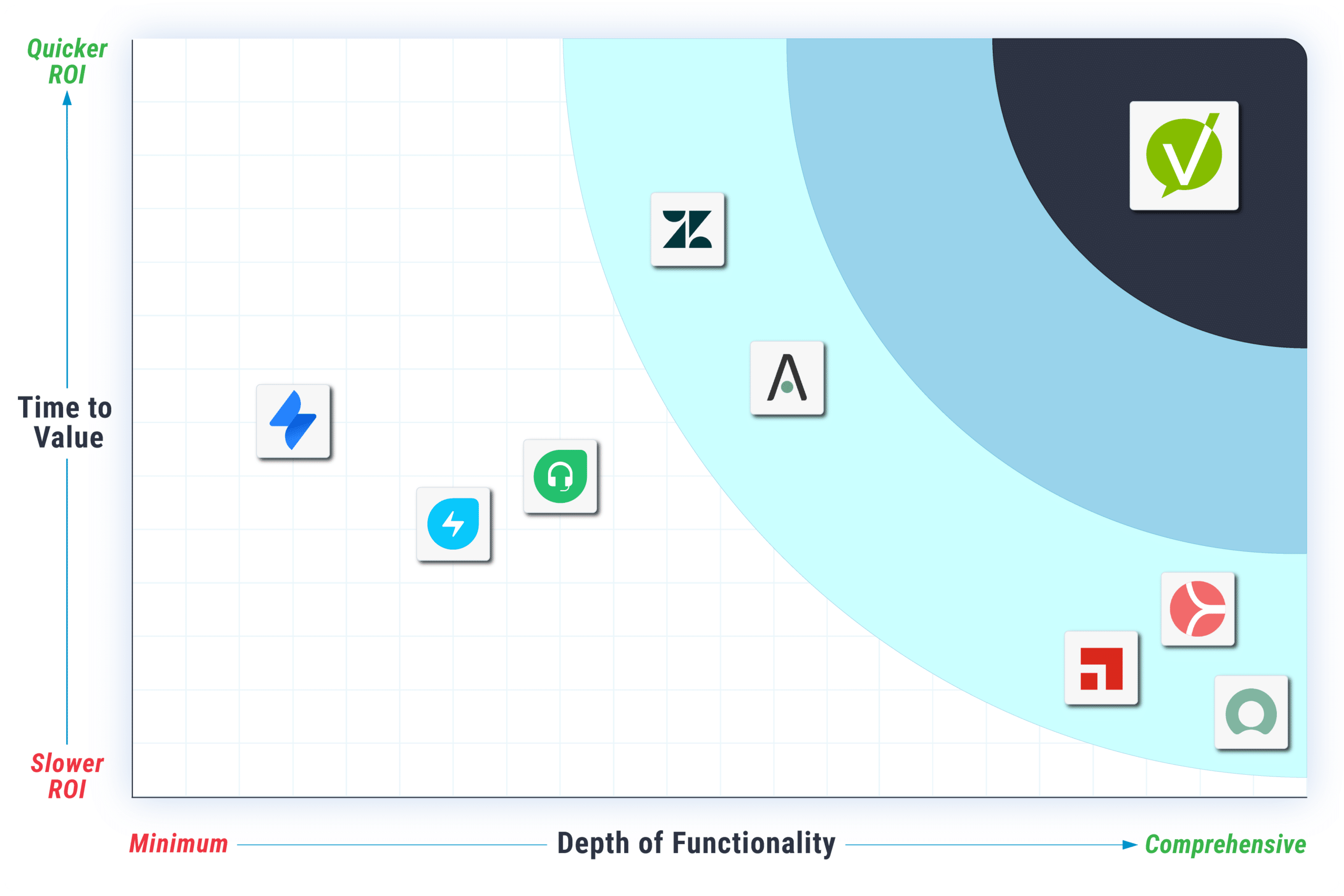
At Vivantio, we understand the importance of a streamlined service management experience. Our platform eliminates common obstacles so you can focus on achieving faster ROI and enhancing customer satisfaction:
No Bloated Price Books
While we tailor pricing to your needs, you’ll never find hidden fees or complex bundles.
No Lengthy Implementation
Launch in weeks with our rapid deployment technology and in-house team, reducing time-to-value.
No Gatekeeping Features
Access every feature from day one, maximizing your investment and boosting customer experience.
Pricing
Flexible Licensing to Maximize Your Investment
Choose the licensing model that best suits your team’s needs. With Vivantio’s flexible licensing, you can scale your service operations effectively without overpaying.
Named Licenses
Ideal for dedicated team members who need continuous access.
Concurrent Licenses
Perfect for rotating teams or infrequent users, providing shared access and reducing costs.
Mixed Licensing & License Pools
Combine licensing types and allocate resources to specific teams for efficient use.

Pricing
Pricing Considerations
The Vivantio Platform provides customers with many options to reduce the total license cost.
Number of Agents
Pricing is based on the number of technical users. Customers/end users can access the self-service portal without a license.
License Type
Concurrent licenses are available for shift workers or geographically dispersed teams, allowing multiple users to share a single license within a license pool on a first-come, first-served basis.
Total Volume Discount
Discounts increase with the number of licenses purchased, starting at 15 users and up to 40%. Enterprise licenses are available for teams over 500 users.
Education & Non-profit
Educational institutions qualify for a 5% discount; non-profits receive a 10% discount.
Get Your Custom Quote
There are a number of ways to reduce your service management costs.
- Named vs Concurrent Licenses
Volume discounts across multiple teams
- Education and Non-profit discounts
- Multi-year discounts
Complete the form for your custom quote:
Comprehensive Feature List
Vivantio brings enterprise functionality to every team. Access all features in a single, comprehensive package…with a sensible price tag.
| Configurable Ticket Types | Create and configure unlimited ticket types that can be used to map one-to-one with each of your teams, giving each team dedicated configuration (categories, priorities, custom forms, and fields) while retaining the ability to collaborate and transfer work | Unlimited |
| OOB Incident, Problem, Service Request, Change Management | Supports basic service management ticket types | |
| Service Level Management | Move beyond simple “open to close” SLAs to configurable service levels with definable milestones like response, diagnose and fix. | User Defined |
| Client Management | Store and manage customer data — whether you’re using it as a standalone CRM, or as an integrated front-end to surface data from external systems to your service teams | |
| Knowledge Management | Create, update, categorize, and manage any type of documentation in a comprehensive document/file management system. Then use those articles to deflect tickets in the SSP, provide recommendations on troubleshooting to your agents, and information on software/hardware to your technicians | |
| Asset Management / CMDB | Track, monitor, and manage your IT assets with built-in CMDB | |
| Surveys | Define rules to control when to trigger customer satisfaction surveys after ticket resolution, with the option to configure different types of survey | |
| Task Management | Create sub-work items, each with its own complete set of data, inherited or not from the parent ticket — from any ticket or request, and reassign those to other individuals or teams | |
| Third Party Management | Record your third parties, assign work to them, and report on the number of third-party referrals | |
| Personalized Workspaces | Designed to create the ideal working environment for each technician across your whole organization. | |
| Multi-line Detail Screens | Subscribe to tickets for updates or bookmark them for quick access and visibility | |
| Working Time Plans | Configure one (T1) or more (T2+) working time plans that can be used for your SLAs, OLAs, and more. Use multiple time plans to capture different regions, offices, or service hours for different customer tiers | |
| ITIL4 | Enable OOB ITIL requirements for full compatibility, or pick and choose which elements work for you across 4 dedicated areas for the core processes |
| Rich Text History & Notes with Generative AI | Embed images, screenshots, and files and use AI text formatting features when interacting with customers | |
| Link Tickets to Articles | Send articles to customers during ticket closure, saving technician time – use a stock response which includes a link to and a description of the article | |
| Watch List | Subscribe to tickets for updates or bookmark them for quick access and visibility | |
| Customizable Columns | Enable agents to control which data fields are visible in any grid view | |
| Ticket Templates | Provide ticket templates to help agents log tickets in seconds by adding end-user details | |
| Note Templates | Set up ‘canned responses’ that agents can use at any point during the ticket lifecycle | |
| Track Effort | Record the amount of time technicians spend working on tickets, with higher tiers including the option to easily start/stop the clock and/or automatically record the time spent looking at tickets | |
| Out Of Office | Allow your team to record their OOO time the same way they’d record it in a calendar system, surface that information to other agents, and exclude OOO agents from automated assignment adding delegates and additional recipients for their work | |
| Custom Forms & Fields | Control the visibility of one form or field based on the values selected in other fields | |
| Multiline Custom Forms | Send articles to customers during ticket closure, saving technician time – use a stock response which includes a link to and a description of the article | |
| Conditional Custom Forms | Control the visibility of custom forms to always appear or to only appear for certain ticket categories or statuses | |
| Linked Custom Fields | Link fields between system areas to combine them into one custom form | |
| Email Templates | Pre-populate email templates for rapid response. Support embedding of database merge fields | |
| Workflow Designer | Define complex, multi-step processes, with a series of tasks assigned to different individuals to complete in specific order, and automatically apply them to specific ticket types |
| Client Management | Store and manage customer data — whether you’re using it as a standalone CRM, or as an integrated front-end to surface data from external systems to your service teams | |
| Client Categories | Configure the relevant categories that appear as options for specific clients when creating tickets | |
| Client SLAs | Configure priorities and SLAs on a client-by-client basis | |
| Client Alerts | Add alerts that are visible on tickets and contact records for specific clients | |
| Client Highlight Rules | Use client highlight rules to spotlight certain clients from other system area lists | |
| Custom Forms and Fields | Build custom forms and fields to hold unique client information | |
| Cascading Custom Forms and Fields | Control the visibility of one form or field based on the values selected in other fields | |
| Conditional Custom Forms and Fields | Control the visibility of custom forms to always appear or to only appear for certain ticket categories or statuses | |
| Client Categorization | Differentiate between different client types |
| Asset Management | Track, monitor, and manage your IT assets with built-in CMDB | |
| Asset Types and Categorization | Setup different types of asset configuration | |
| Customizable Asset Layout | Customize the layout of the forms within the Asset working window. Configure the order forms appear in, if they show up as a card or a tab, and which roles have access to each form | |
| Asset Auditing | Maintain a complete audit trail of all changes made to an asset over time/td> | |
| Asset Relationships | Link related assets using custom-configured downstream and upstream relationship types | |
| Impact Maps | Provide a graphical representation of the entire network of people and systems that could be impacted by a change | |
| Asset ticket history | Record all tickets or service requests that have been logged against an asset | |
| Asset Federation | Pull data from as many different sources as required, combining, and consolidating it for subsequent auditing, reporting, and analysis | |
| Advanced Asset Management | Store all asset data with custom forms, fields, and relationships, and full integration with the rest of the service platform | |
| Cascading Custom Forms and Fields | Control the visibility of one form or field based on the values selected in other fields | |
| Conditional Custom Forms and Fields | Control the visibility of custom forms to always appear or to only appear for certain ticket categories or statuses | |
| Asset Discovery | Scan and import assets from the entire organization or from customer systems | Add-On |
| Knowledge Base | Create, update, categorize, and manage any type of documentation in a comprehensive document/file management system. Then use those articles to deflect tickets in the SSP, provide recommendations on troubleshooting to your agents, and information on software/hardware to your technicians | |
| Knowledge Base Segregation | Define visibility for system users, customers, or public access articles | |
| Article Templates | Create templates for knowledge base articles requiring preset fields by category | |
| Article Themes | Create a consistent look-and-feel for your knowledge base articles, with the ability to enforce use of a header/footer/custom CSS, or even to change the entire layout of the article using templating and variable substitution. Brand the same article differently per-client, changing the look and feel depending on which of your customers is viewing it | |
| Customizable Article Layout | Customize the layout of the forms within the KB working window. Configure the order forms appear in, if they show up as a card or a tab, and which roles have access to each form/td> | |
| Customer Knowledge Base Feedback | Allow customers and end users to rate and comment on knowledge base articles | |
| Article Expiry | Set visibility dates for knowledge base articles to expire and be reviewed | |
| Article creation on ticket closure | Automatically create articles on ticket closure |
| Surveys | Define rules to control when to trigger customer satisfaction surveys after ticket resolution, with the option to configure different types of survey | |
| NPS/CSAT Surveys | Send one-off surveys to large groups of customers, and analyze and report on their feedback | |
| Sentiment Surveys | Enable customers to provide easy, anonymous, one-click feedback at any point during the lifecycle of a ticket |
| Report Builder | Explore the data in your instance via an intuitive user interface | |
| Report Catalog | Leverage a library of pre-built reports that come not just ready-to-run, but ready-to-customize | |
| Live Dashboards | Set up fully customizable schedules for any report to automatically email whoever needs to see it. Define a report template to execute on a regular basis for several clients for per-client reporting. | |
| Scheduled Reports | Maintain a complete audit trail of all changes made to an asset over time/td> | |
| Wallboards | Create customer documents/worksheets /reports from the data in a specific ticket, run directly from that ticket. |
|
| Quick Reports | Provide a graphical representation of the entire network of people and systems that could be impacted by a change | |
| Built-in BI | Visualize data in a variety of ways within your service management environment | |
| BI Integrations | Surface your data where you need it via OOB integrations with several different BI tools, or via specialized API endpoints for maximum compatibility | |
| Managed Data Warehouse | Build your own OLAP-like data warehouse using your service provider’s servers and infrastructure/td> | |
| Customer Portal Reports | Push specific reports to your self-service portal to allow customers/end users with the appropriate permissions to run reports | |
| oData | Supports oData connections | |
| Data Builder | A high performance, feature rich, Data Table and React Data Grid reporting tool with built in charting |
| Sentiment Analysis | Automatically determine the emotional tone of tickets and highlight and apply automations accordingly | |
| Summarization of Ticket | Provide a summary of the activity on a ticket automatically using AI | |
| Knowledge Search | Allow end users/customers and technicians to search and use AI to summarize an answer based on knowledge base articles | |
| Text Editor | Use generative AI to build feedback to customers. Use AI tools to check notes for error, language and adjust tone |
| Email to Ticket | Turn emails into tickets automatically with support for embedded images/video and attachments | |
| Sender tracking | Lookup the sender from the CRM. Link all cc recipients to the ticket | |
| Email Themes | Set up multiple themes or brands for your email templates, with the option to change the look and feel depending on which of your customers it’s being sent to | |
| Email Signatures | Support multiple signatures | |
| Email Templates | Pre-populate email templates for rapid response. Support embedding of database merge fields | |
| Template Action Types | Built templates inked to specific action types such as change priority, change owner etc. | |
| Review / Reply / Forward | Review original email, reply to all or forward the email internally or externally | |
| Smart Actions | Extract the email information and insert into the ticket details and history to provide a cleaner activity view | |
| Integrations | Integrate with all major modern email platforms such as MS365, Microsoft Exchange & Google | |
| Email-to-Ticket Sender Rules | Control who can log tickets with you via email, and who is restricted to just updating, or not using email at all |
| Self Service Portal | Enable customers to log tickets, view assets and knowledge base articles, and run reports in a fully configurable self-service portal. Portals should be available per customer or department, and support different branding in each portal | |
| Self Service Portal Instances | Create multiple custom branded self service portals to embed in your website or organization | |
| Guided Categories | Use a wizard like category selector to guide users into choosing the right ticket categorization | |
| Ticket Deflection | Surface answers to customers during the ticket creation process to resolve their issue before it’s logged | |
| Service Catalog | Define your services, expose them to your end users via the self-service portal, allow users to request those services by submitting service request tickets, and captures the information you need to deliver those services using custom forms – followed up by using trigger rules and workflow to automate the necessary approvals/other steps required to deliver those services | |
| Self Service Roles | Exercise granular control over who can do what inside the SSP | |
| Anonymous SSP Access | Expose your Knowledge Base to anonymous users, with the ability to filter what they can do/see | |
| Theme Editor | Customize the look and feel of your portal, allowing it to match your corporate website or your existing intranet | |
| Page Editor | Build completely custom content within your SSP(s) | |
| Localization | Implement and customize out-of-the-box language packs, or build your own | |
| HTML & CSS | Have complete control over the HTML and CSS, providing ultimate flexibility in look and feel | |
| Multiple IdP | Integrate your SSP with your customers’ infrastructure, making the experience seamless and reducing friction | |
| JavaScript | Supports native JavaScript for advanced functionality and API access | |
| Self Service Reports | Enable customers to run self-service reports on demand | |
| Self Service Dashboards | Expose data to your customers in the self-service portal, without the need to understand complex reports, and without giving them the ability to see the underlying data – so you can show everyone overall statistics without compromising your data |
| Routing Rules | Automatically assign tickets based on criteria you specify — including AI-driven insights — as soon as the ticket is created | |
| Round Robin Assignment | Distribute work in name-order between specific groups, defining rules for whether this applies to all or a subset of tickets | |
| Dynamic Assignment | Define complex, multi-step processes, with a series of tasks assigned to different individuals to complete in specific order, and automatically apply them to specific ticket types |
|
| Skills-based Routing | Leverage AI to determine which ticket types each technician is best suited to resolving, using that to prioritize new work assignments | |
| Follow-the-Sun Routing | Automatically re-assign tickets on a configurable schedule and only when certain conditions are met, such as customers who have purchased premium service plans | |
| Trigger Rules | Define a comprehensive “if this, then that” style of automation | |
| Escalation Rules | Define a rich set of rules for notifying agents and reassigning tickets based on your SLAs | |
| Article Scheduled Events | Define complex rules for when, how, and by who articles should be reviewed. Set up custom schedules to define which articles need to be reviewed, automatically create tickets for the article authors to review, and tag in others who have edited those articles | |
| Client/Location/ Caller Scheduled Events | Define recurring tasks at a variety of levels — for a customer, for a specific location/ department, or even down to the individual | |
| Asset Scheduled Events | Define recurring tasks based on any attribute of your assets — standard or custom fields. Choose to ‘batch’ assets, and assign a team to work through them, or create individual tasks for each asset, and use tools like Round Robin or Weighted Assignment to distribute work evenly for large projects | |
| Ticket Scheduled Events | Catalog and schedule all routine work. Layer onto: Business Rules to send notifications and reassign work when people are out of the office; SLAs to ensure work is done on time; and reporting to track everything has been done and complete your audit trail | |
| Custom Processes | Define custom processes with as many conditions and steps as required, interacting with as many functionalities as you like |
| Expression Builder Task Assignment | Define complex, field-based rules for assignment, with support for navigating the full set of data related to any given request | |
| Dynamic Assignment | Set up complex, field-based rules for assignment, with support for navigating the full set of data related to any given request | |
| End-user Task Assignment | Define complex, multi-step processes, with a series of tasks assigned to different individuals to complete in specific order, and automatically apply them to specific ticket types | |
| Advanced Workflows | Leverage AI to determine which ticket types each technician is best suited to resolving, using that to prioritize new work assignments | |
| Dynamic Workflows | Enable system decisions based on ticket details and related attributes | |
| Approval workflows | Define both simple and complex approval processes |
| Ticket Templates | Provide ticket templates to help agents log tickets in seconds by adding end-user details | |
| Note Templates | Set up ‘canned responses’ that agents can use at any point during the ticket lifecycle | |
| Customizable Columns | Enable agents to control which data fields are visible in any grid view | |
| Task Management | Create sub-work items — each with its own complete set of data, inherited or not from the parent ticket from any ticket or request, and reassign those to other individuals or teams | |
| ITIL4 Compatible | Enable OOB ITIL requirements for full compatibility, or pick and choose which elements work for you across 4 dedicated areas for the core processes (I/P/C/SR) | |
| Effort Tracking | Record the amount of time technicians spend working on tickets, with higher tiers including the option to easily start/stop the clock and/or automatically record the time spent looking at tickets | |
| Extended SLAs | Monitor the time it takes to get to different points in the ticket lifecycle, like the first response to a customer, or issue diagnosis | |
| Out of Office | Allow your team to record their OOO time the same way they’d record it in a calendar system, surface that information to other agents, and exclude OOO agents from automated assignment — adding delegates and additional recipients for their work | |
| Custom SLAs / OLAs | Define completely custom KPIs — use the expression builder to define start/end conditions, set targets for those based on ticket priority, alerts using escalation rules, and reports using built-in BI tools. | |
| Working Time Plans | Configure one (T1) or more (T2+) working time plans that can be used for your SLAs, OLAs, and more. Use multiple time plans to capture different regions, offices, or service hours for different customer tiers | |
| Agent Home View | Provide a single view of all work assigned to a specific user, regardless of work type | |
| Article Suggestions | Leverage AI to analyze the properties of a ticket — including the title/description, keywords, linked assets, and customer info — and find articles in your knowledge base which may help agents resolve a logged issue | |
| Highlighting Rules | Make certain types of tickets more prominent in a list by assigning icons and/or colors based on priority, category, end user, or any other ticket field | |
| Effort Tracking | Record the amount of time technicians spend working on tickets, with higher tiers including the option to easily start/stop the clock and/or automatically record the time spent looking at tickets | |
| Insights | Insights puts all the information you need to resolve a ticket directly at your fingertips, while you’re working the ticket | |
| Load Balancer | See granular detail on your team’s capacity – who is doing what and how close they are to finishing it – and reassign work instantly to help you meet service targets | |
| Kanban View | View a dashboard of your WIP, along with easy drag-and-drop updates | |
| Calendar View | View an Outlook-style calendar of upcoming work and deadlines, allowing you to determine when or how you can fit in new work | |
| In-browser Notifications | Have customizable notifications appear in-browser for agents, whether it’s an update to a ticket they own, a new urgent ticket being logged, or a request for help from a colleague | |
| Conflict Warnings | See when tickets are already being worked by other technicians to avoid duplicated effort | |
| Impact / Urgency Matrix | Disable manual selection of ticket priorities by your agents or end users, instead requiring them to describe the impact and urgency, from which the priority will be derived | |
| Collision Detection | Receive a notification when another agent is updating the record you’re viewing to prevent duplication |
| Email-to-ticket | Monitor a single mailbox (T1) or multiple mailboxes (T2+) and automatically turn incoming emails into tickets and/or updates, backed up with comprehensive rules allowing for allow/deny listing, subject blocking, etc | |
| Intelligent Ticket History Update | Show both your agents and customers the full conversation as part of each email sent or received | |
| CRM | Surface information from your CRM system in your service platform, and service information in your CRM system and automatically apply them to specific ticket types |
|
| Webhooks | Write completely custom HTTP notifications that can be sent on-demand or automatically to your other systems | |
| Web Methods | Build lightweight HTTP endpoints that can respond to specific requests from other systems, even if you’re not able to control what the other system sends in | |
| iPaaS | Leverage an embedded iPaaS tool to enable bi-directional integrations across hundreds of applications | |
| Data Import | Build custom integrations using the service platform’s API, with all features and functionality exposed | |
| Integration Services | Push information from your local systems into your service platform on a regular basis | |
| UCX | Allow end users to raise tickets directly to the service desk, rather than by chatting to an individual. For the cases when an individual does receive a chat, they can create – and work – the ticket from within the UCX tool | |
| Asset Discovery / RMM | Surface discovered assets and relevant associated data from your asset discovery/RMM tools in your service platform for monitoring and reporting | |
| HCM | Transfer data bi-directionally between your service platform and your HCM tools, so employee information surfaces as soon as it’s available, and your service management team can make changes within other systems as part of your workflows | |
| ALM | Transfer information bi-directionally between your service and development teams, with the ability to create/update work between systems in both directions | |
| Chat | Create, update, and view tickets within your corporate chat tools, like Microsoft Teams and Slack | |
| Caller Integration | Connect to Azure, Google, On Premise AD or other platforms to synchronize caller information | |
| Open API | Access public API documentation to code directly against the Vivantio API | |
| ALM | Transfer information bi-directionally between your service and development teams, with the ability to create/update work between systems in both directions |
| Field-level Permissions | Control, at a granular level, who can see and modify each field on any record | |
| Data Permissions | Control which members of your team(s) can see which records | |
| Process Permissions | Control who can do what, which records they can do it to, and when they can do it | |
| Define field, data, and process permissions sets, and control access for other areas, such as reports, dashboards, and queues | ||
| Purge Data | Permanently remove all traces of records from your service platform instance (GDPR compliance) |
| Active Directory Single Sign-On | Sign into your service platform from your existing Active Directory (Azure, Okta, etc.) | |
| Restrict Login by IP | Control exactly which IP addresses/ranges are allowed to access your service platform | |
| SAML Single Sign-On | Allow agents and end users to log into the service platform and self-service portal quickly and easily, respectively, using your organisation’s preferred Identity Provider (IdP) | |
| Advanced Workflows | Use any app that’s compatible with Google Authenticator | |
| Two Factor Auth | Enable system decisions based on ticket details and related attributes | |
| Active Directory Single Sign-On | Allow agents and end users to log into the service platform and self-service portal quickly and easily, respectively, using your organisation’s existing Active Directory (AD) infrastructure | |
| Password Policies | Control options such as password expiry, password complexity, and preventing re-use of recent passwords |
| Transparency | Simple and easy-to-understand license model. No hidden costs. Single license for all features | |
| Concurrent Licensing | Purchase shared licenses, which can be divided up into configurable ‘pools’, allowing multiple individuals access to your system, without having to purchase an individual license for each user | |
| Named Licenses | Technicians who need constant access to the system need a named license. It is dedicated to them and cannot be shared. | |
| Combined Licensing | Combining a mixture of named and concurrent licenses can significantly reduce overall license costs while still providing access to everyone who needs it. | |
| License Pools | Allocate technicians and licenses to one or more license pool to make sure your concurrent licenses are available for those who need them most. |
| Data Encryption at Rest | Leverage optional at-rest data encryption of your entire data set | |
| Choice of hosting location | Choose your hosting location at no extra cost, and with no reduction in service | |
| Hybrid | Host on your own Azure platform | |
| Azure Government Cloud | Keep your entire platform inside the Azure Government Cloud for the highest levels of compliance, without sacrificing features such as weekly updates, high availability, proactive monitoring, and best-in-class support | |
| Geographic Redundancy | Choose the level of platform service you need – from the standard level of support (99.95% uptime) to customizable higher tiers | |
| ISO27001 / SOC2 / Cyber Essentials | Vivantio values security | |
| HIPPA Compliant | Protecting customers health record information |
| Professional Services | Access an in-house team to help you to implement and make complex changes to your system | |
| Customer Success Manager | Access an in-house product expert who’s dedicated to supporting your team | |
| White Glove Implementation | Leverage the option for in-house product experts’ scope and build the system based on your specific requirements | |
| Technical Support | Offers free phone, email, self-service support to all customers | |
| Extended support | Offers extended support hours | |
| User Groups | Conducts annual customer users’ groups and maintains customer facing forums | |
| POC | Offers free proof of concept built to prove product alignment | |
| Sandbox | Provides ability to have a sandbox environment for building and testing configuration |
Pricing
Frequently Asked Questions
FAQs for Businesses Seeking Streamlined Service Management and Accelerated ROI. Don’t see the answer you’re looking for? Have a chat with our friendly team.

Only users of the main application require a license. That license can be a named license and dedicated to that user, or a shared concurrent license. End customers who make use of mail to ticket, or self service portals do not require a license.
Yes. Vivantio’s concurrent licensing is ideal for shift-based teams, ensuring efficient resource allocation while maximizing ROI.
Vivantio simplifies IT asset management, automates ticket routing, and helps you exceed SLAs, all of which contribute to reduced time-to-value.
Absolutely. Vivantio integrates with popular CRM systems like Salesforce, helping ISVs align teams and boost customer satisfaction scores.
Volume discounts start at 15 users and continue to rise up to 40%.
The discount is applied to the total combined name and concurrent licenses purchased.
If you are a non-profit, charity or in education, expect to receive between 5 and 10% additional discount.
Vivantio is a subscription service and you can increase license subscription at any time. If you wish to decrease or cancel your subscription, you can do so at the end of your term.
No. We’ll be in contact throughout the year to make sure you get the very best from your investment. We’ll talk to you about your renewal about three months out.
No problem! Reach out to one of our solution consultants for help or advice here: Contact Us
Reduced Time-to-Value
Maximizing Your ROI
Empower your team with Vivantio’s fully customizable, no-code service management platform. Built to simplify operations and enhance customer satisfaction, Vivantio equips your business with everything needed to scale and optimize service delivery efficiently.
Streamline Operations:
Robust, no-code tools make setup and customization simple, so your team can work smarter, not harder.
Boost Customer Satisfaction:
Improve service quality and response times to keep customers happy and engaged.
Achieve Faster Time-to-Value:
See immediate impact and ROI with tools and services designed to drive results from day one.
Why Vivantio is the Right Service Management Solution for You
Vivantio combines flexibility with a comprehensive feature set tailored for ISVs, TSPs, and MSPs. Our platform helps drive accelerated ROI by addressing your industry-specific needs:
For ISVs: Integrate seamlessly with CRM systems, boost customer satisfaction scores, and streamline onboarding.
For TSPs: Centralize workflows, scale operations effectively, and enhance customer satisfaction with efficient service delivery.
For MSPs: Manage IT assets, automate ticketing, and meet SLAs with powerful time-to-value measurement tools.
Our Customers Continue to Love Us!
Request a Quote
Vivantio enables you to build a robust Service Management system that fits your organization by enabling only the features you need.
Have a question or just looking to connect?